How to set up your first Local LLM in 10 Steps ( Full-course )
A 10-step roadmap to a local LLM stack you use daily: memory sizing, model picking, Ollama install, quantization, hardware buying, serving as an API, small-model routing, and six ready-to-run workloads.
Most people who try to run a model at home end up with a $3,000 graphics card that sits idle twenty hours a day and a chatbot that forgets the conversation after four pages. They do not know how much memory the model needs. They do not know which of the 1,303 versions of the same model to download. They do not know why it runs at a third of the speed someone posted on X. This is the 10-step roadmap that turns that mess into a local stack you use every day.
An open model is an AI model whose file anyone can download and run on their own computer. Qwen, DeepSeek, GLM, Gemma, Mistral, Kimi, Nemotron and OpenAI's own gpt-oss are all open. For years they were a hobby. In 2026 that changed: Epoch AI now measures the best of them at about four months behind the closed frontier, and several run on an ordinary laptop.
In the same months, both big AI labs trimmed what their subscriptions give you. Open models getting better while rented ones get tighter is the whole reason this guide exists.
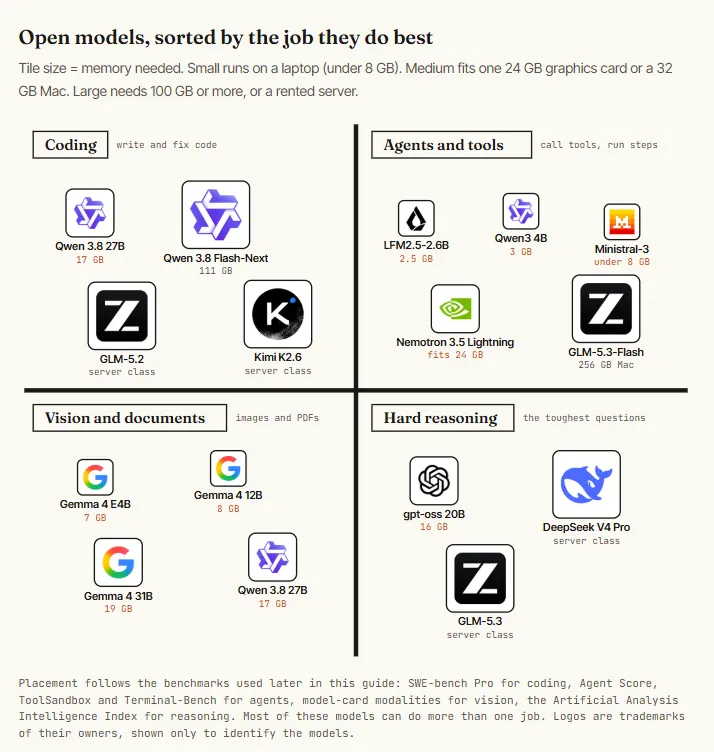
This is the map. Pick the square that matches what you want to do, then look for the smallest tile in it: that is the model you can run today on what you already own.
Hugging Face's Clement Delangue, on why open models are winning for real workloads: “It took much less time than I expected for companies to realize it's better, cheaper, faster to use and train open models themselves rather than use APIs for many tasks.”
You do not need to buy anything or understand everything first. Start with Step 0 and get a model answering you. The rest of the guide explains what you just did and where to take it.
Capacity is what fits. Bandwidth is how fast it runs. Utilization is whether it pays.
00. First run one install, one command, one answer
A local LLM is a file you download and a small program that runs it. That is all. The file is the model. The program here is Ollama, which is free. You type a question, the model answers, and nothing leaves your computer.
- Check how much memory you have. Memory decides which model you can run, so look it up first.
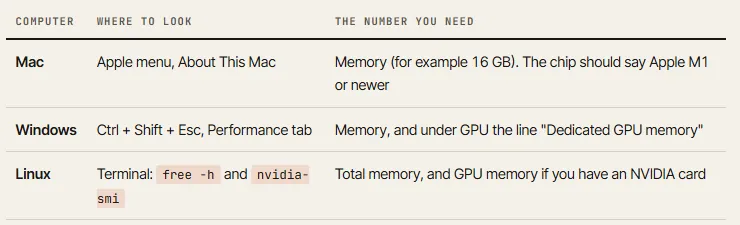
free -h on Linux.- Pick your first model from this table. The rule behind it: the download should be no bigger than about two thirds of your memory.
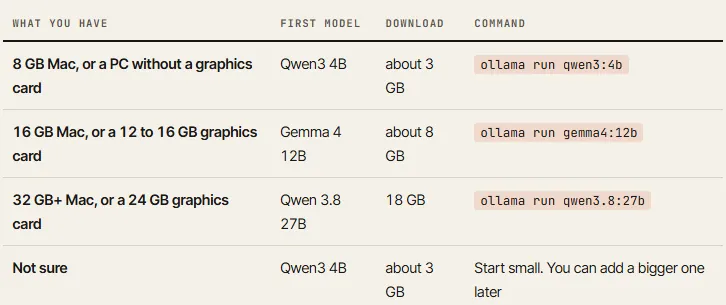
- On a Mac with an M-series chip, the whole memory is available to the model.
- On a Windows or Linux PC, the model wants the graphics card's own memory (VRAM), and regular RAM is a slow fallback.
- No graphics card means small models only.
- Install Ollama and run the model. Open Terminal on a Mac (Cmd + Space, type Terminal) or PowerShell on Windows (Start menu, type PowerShell). Paste one line, press Enter.
# Mac or Linux
$ curl -fsSL https://ollama.com/install.sh | sh

# Windows (PowerShell)
> irm https://ollama.com/install.ps1 | iex

# then, on any system: download and start your model from the table
$ ollama run qwen3:4b- What you should see. A progress bar while the file downloads, once. Then a prompt that waits for you. Type a question and press Enter.
pulling manifest
pulling 3e4cb1417446... 100% ▕████████████████▏ 2.6 GB
success
>>> Explain what a context window is in two sentences.

A context window is the amount of text the model can look at
at one time, including your question and its own answer...

>>> /bye                 # leaves the chat. run the same command to come back
That is a local LLM, installed and working. Turn off your Wi-Fi and ask again: it still answers.
The ten words you will keep meeting. Read them once now.
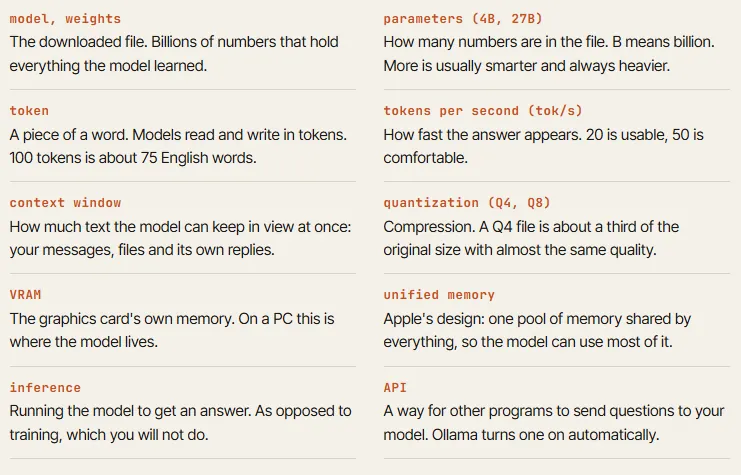
01. Why — know what you are buying before you buy it
A local model gives you four things an API can't: your data never leaves the machine, nobody can change your limits, the cost per extra request is zero, and the model stays the same until you decide to replace it. It does not give you the smartest model on the market.
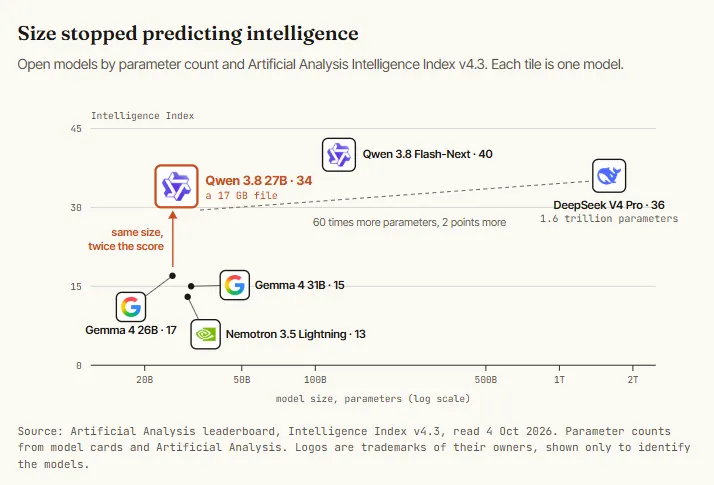
Be precise about that last part. On the current Artificial Analysis Intelligence Index, Qwen 3.8 27B scores 34. DeepSeek V4 Pro, a model with sixty times more parameters that needs a server, scores 36. The best open model scores 46, and the best closed one scores 58. A 17 GB file on your desk keeps pace with open models far larger than itself, and it is a real coding and agent model. The closed frontier is still clearly ahead.
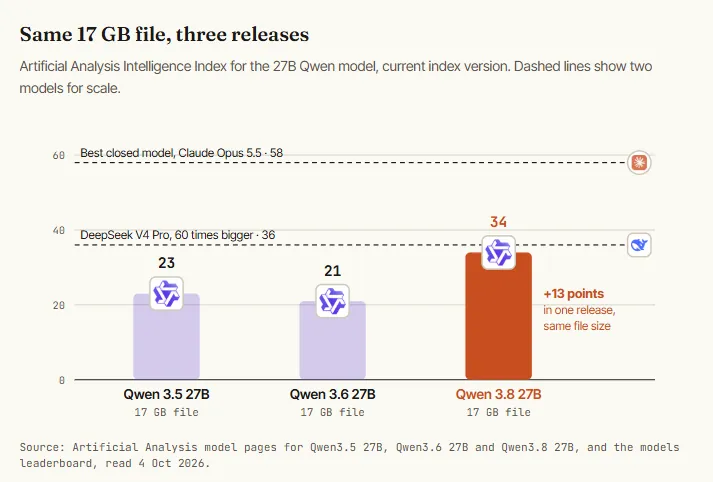
When it launched in August 2026, on the previous version of the same index, it scored 52: level with OpenAI's GPT-5.6 Luna and one point behind DeepSeek V4 Pro and GLM-5.2. The index was made harder in September, so every score dropped. The ranking around it barely moved.
The gap is also shrinking. Epoch AI measured it in May 2026: since January, the best open-weight models have trailed the closed frontier by about four months. What you can download today is roughly what you were paying for last spring.
02. Subsidy — see who pays for your tokens today
Flat-rate plans are sold below cost to heavy users. Reporting from June 2026 put the compute behind a fully used $200 ChatGPT Pro seat at roughly $14,000 a month, and a fully used Claude Max seat at roughly $8,000. The same reporting, citing SemiAnalysis, says an OpenAI Pro seat stops being profitable once the user consumes more than about 5.7% of what the plan allows.
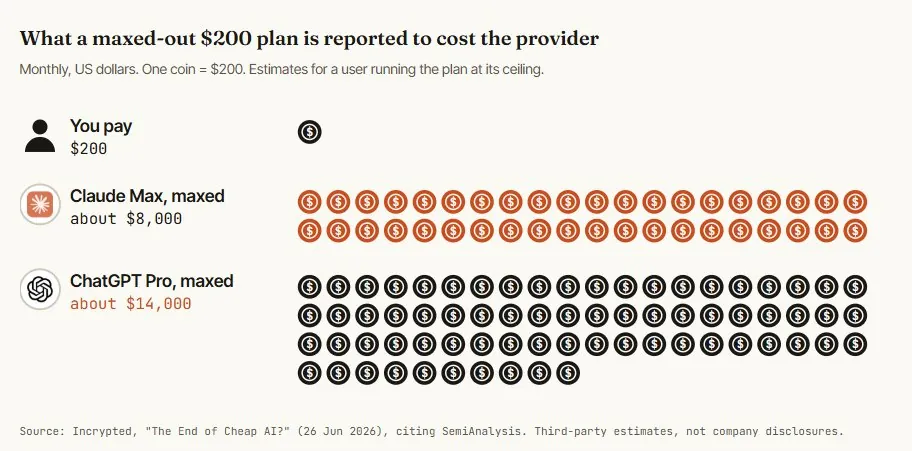
A gap like that closes from the provider's side. On 14 September 2026 Anthropic's Claude Code weekly limits dropped 17% from their summer peak. OpenAI lowered the allowance on its $200 tier at the same price and added a $500 tier above it. Nothing dramatic, and that is the point: your budget for agent work is set by someone else's margin.
LLMJunky, on the new 256 GB M5 Ultra Studio being leasable for roughly the price of a Max subscription: “For $257 a month, you can have on-device intelligence that never runs out of tokens, and sips power.”
Local is not cheaper per token than a cheap API. One September 2026 analysis priced an M5 Ultra Mac Studio at €1.71 to €2.22 per million output tokens (hardware written off over three years, running around the clock) against $0.47 for the same open model through a cloud API. You go local for control and for unmetered volume. You do not go local to beat the price list.
03. Goals — pick the jobs before the hardware
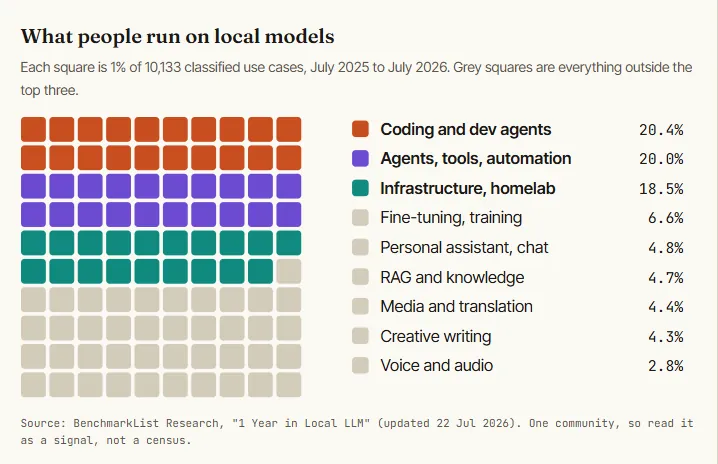
The job decides the model, and the model decides the machine. Write the job list first. This is the split that holds up in practice: start with what people really do with these models. One analysis classified 10,133 use cases from a year of messages in a local-LLM Discord. Chat is a footnote. Agents and coding are 40% of everything.
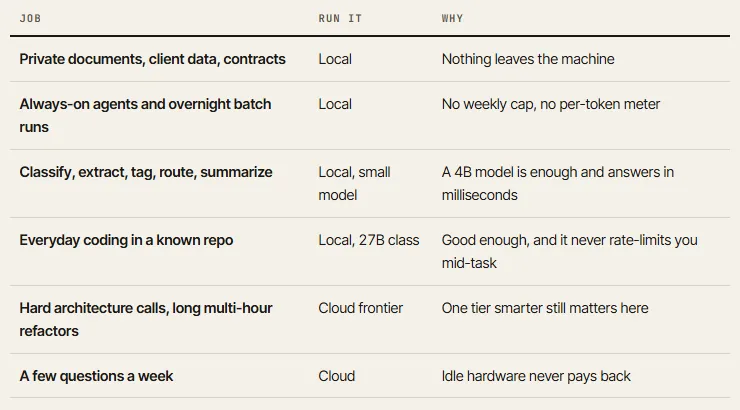
Use this prompt with any chat model to turn your own week into a job list. It forces the numbers you need for the next step.
You are sizing a local LLM setup for me. Ask me nothing. Work from the list below.

MY AI TASKS LAST WEEK
[paste 10 to 20 real tasks: what it was, how long the input was, how often]

For each task output one table row:
task | private data? (yes/no) | input size (tokens, rough) | runs per day |
needs frontier reasoning? (yes/no, one-line reason) | smallest model class
that would do it (4B / 12B / 27B / 100B+ / frontier API)

Then give me three totals:
1. hours per day a local model would be busy
2. the largest context any single task needs
3. the share of tasks that must stay on a frontier API

Do not recommend hardware. Do not round up. If a task is unclear, mark it
"unclear" instead of guessing.
04. Hardware — buy memory and bandwidth, in that order
Generating one token means reading every active weight of the model out of memory once. So two specs set your experience. Memory size decides which models load at all. Memory bandwidth, the speed at which the chip can read that memory, sets the ceiling on tokens per second. Raw compute comes third.
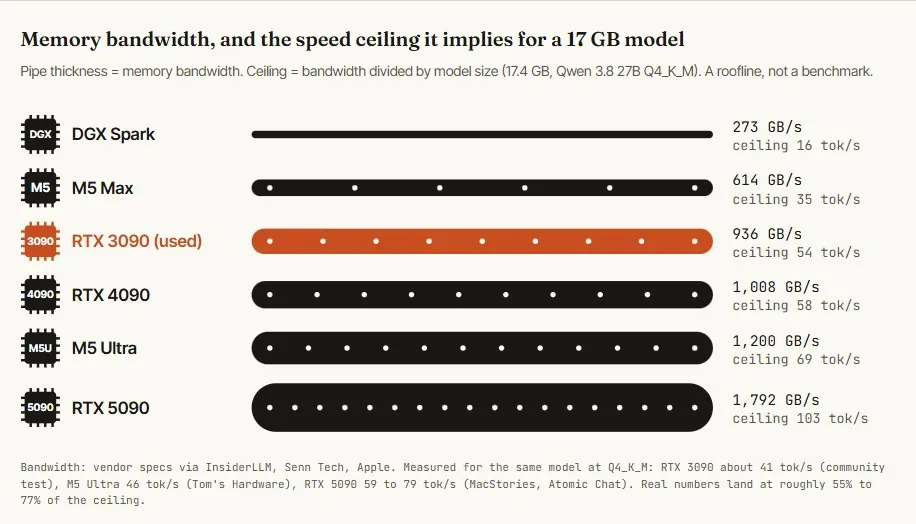
Two patterns fall out of that table. NVIDIA sells very fast memory in small, expensive amounts. Apple sells a large pool of fast-enough memory with a computer attached. If your model fits in 24 to 32 GB, an NVIDIA card wins on speed and on software.
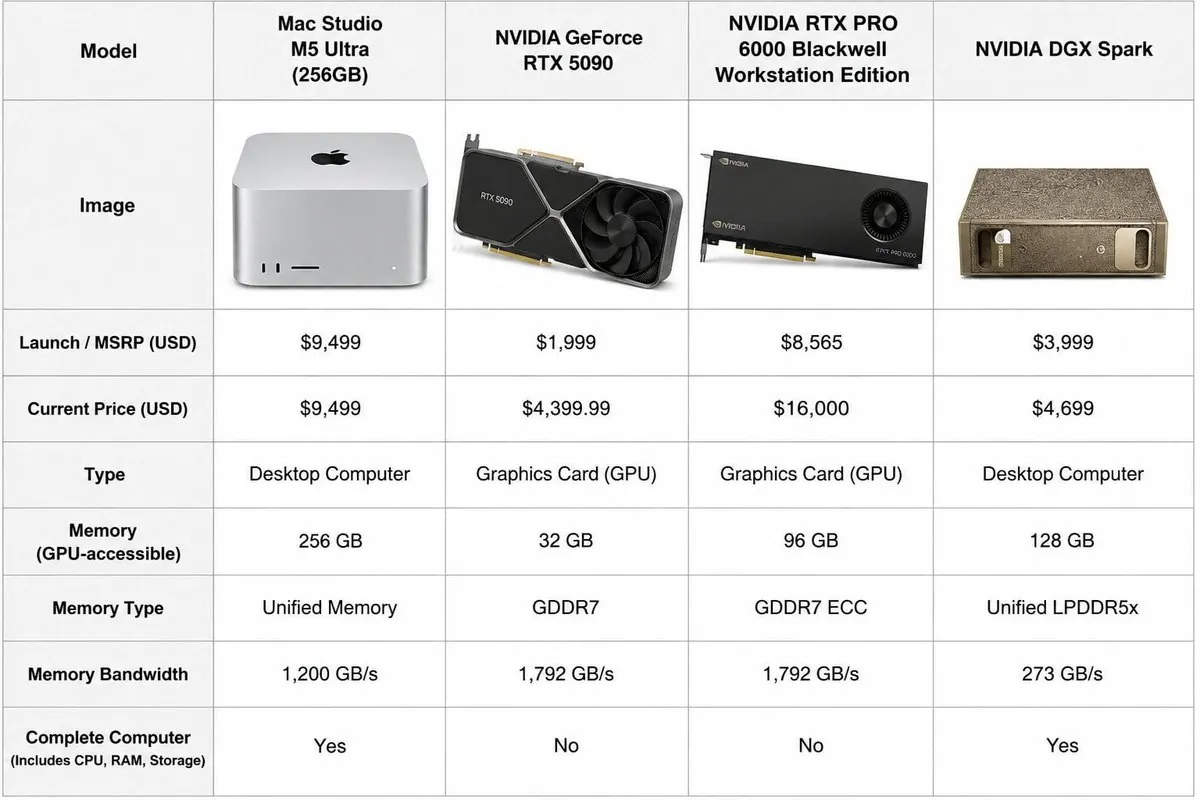
A cloud RTX 3090 costs about $0.22 an hour on RunPod's community tier, and a 4090 about $0.34. Spend $10 running your real workload on rented cards for a weekend. You will know which model you need and how fast it feels before any hardware ships. Vast.ai is the marketplace alternative with floating prices.
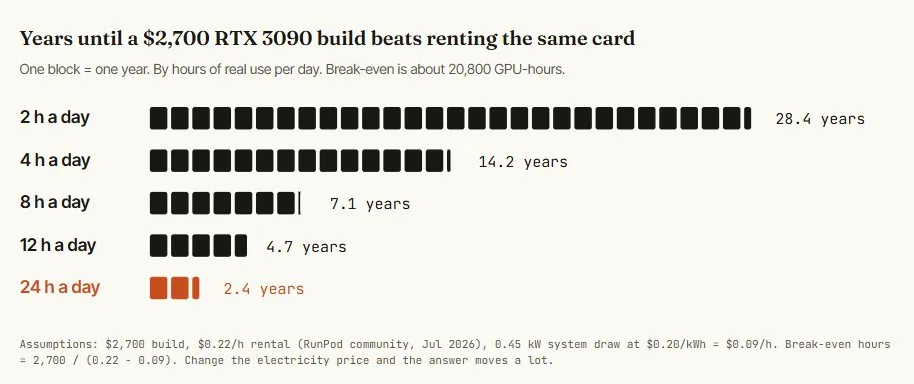
A home AI server pays off when the GPU works all day. Owned for four hours of daily use, it is a silicon space heater.
So the economic case for buying is an always-on workload: agents, batch jobs, a small team sharing one box. The non-economic case is privacy and never seeing a limit banner. Both are valid. Know which one you are paying for.
05. Models — learn the map, then pick one
Hugging Face hosts the weights for every open model. You only need to know a handful of families, sorted by how much memory they want. Now the numbers. Three charts tell you most of what you need to choose.
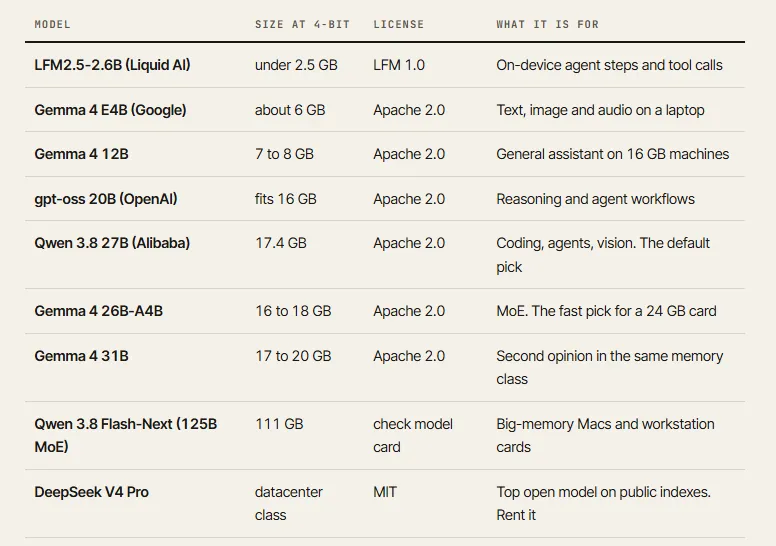
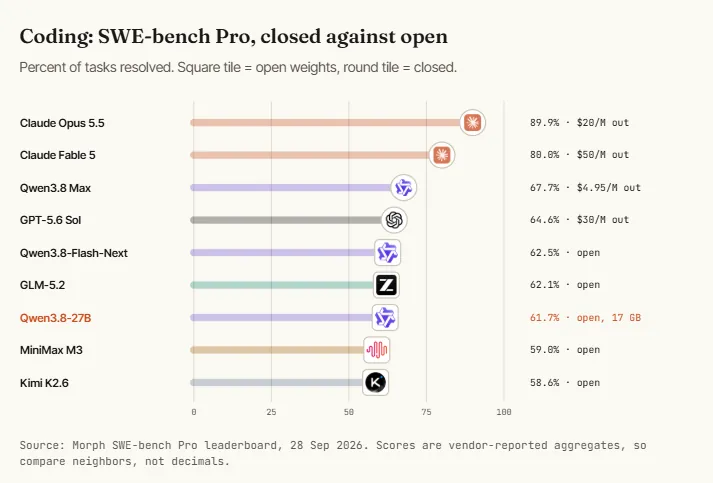
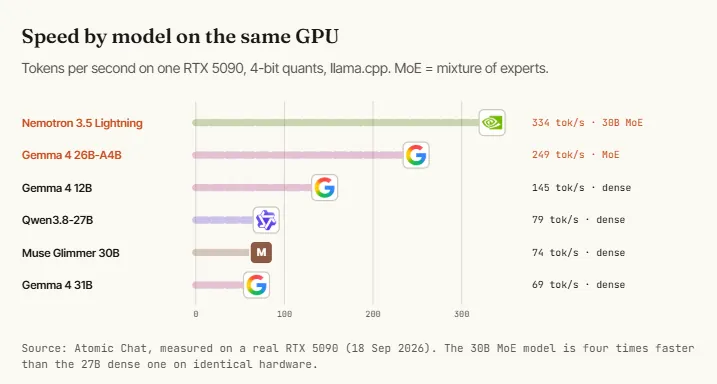
One concept saves you from a common mistake. A dense model uses all of its weights for every token. A mixture-of-experts (MoE) model stores many weights and activates a fraction per token. Total parameters decide how much memory you need. Active parameters decide how fast it runs. That is why a 125B MoE model can generate faster than a dense 27B on the same machine.
06. Quantization — choose the file that fits your memory
Model weights ship as 16-bit numbers. Quantization stores them with fewer bits, so the file shrinks. The full Qwen 3.8 27B is 55 GB. At 4 bits it is 17 GB. An independent benchmark from late August measured what that costs.
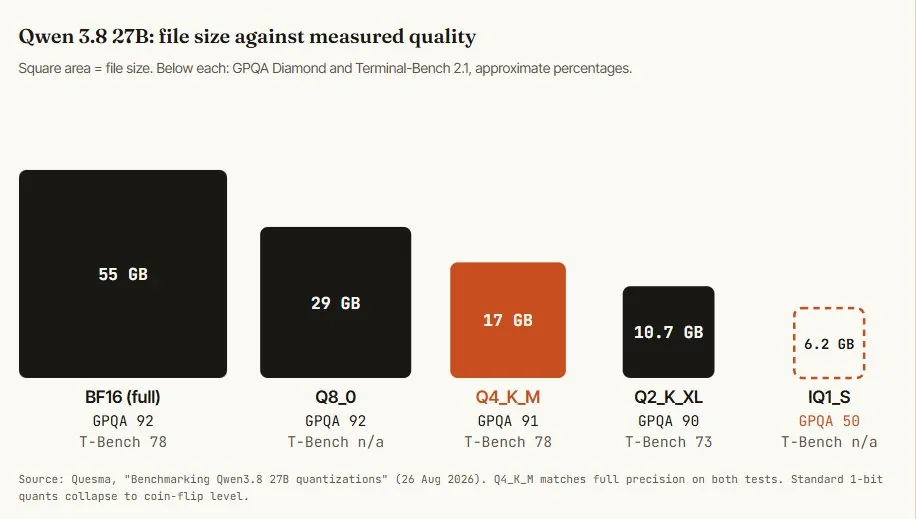
Go lower only when the model will not fit, and expect agentic tasks to degrade before trivia does. The file is half the memory bill. The other half is context. Qwen 3.8 uses a hybrid attention design that stores about 64 KB of cache per token, a quarter of what a classic 64-layer model needs.
# total = model file + context cache + 1 to 2 GB runtime headroom

context     cache     + Q4_K_M 17.4 GB    fits in 24 GB?
  8K        0.5 GB      17.9 GB            yes
 32K        2.0 GB      19.4 GB            yes
 64K        4.0 GB      21.4 GB            yes, tight
128K        8.0 GB      25.4 GB            no  -> drop to IQ4_XS (15.5 GB) or a 32 GB card
262K       16.4 GB      33.8 GB            no  -> 48 GB+ or unified memory
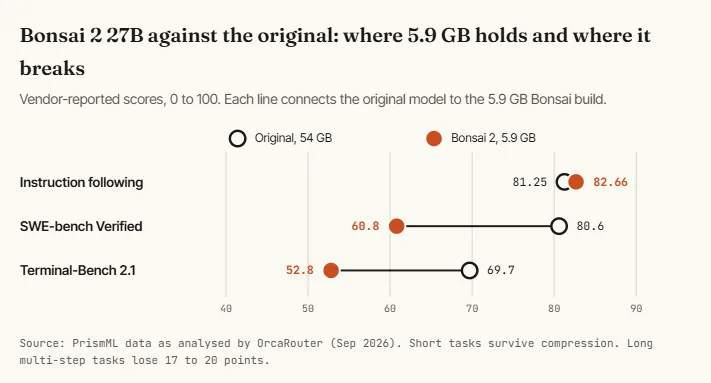
PrismML's Ternary Bonsai 2 27B (17 Sep 2026) is a different technique, trained at 1.76 bits per weight, and lands at 5.9 GB under Apache 2.0. PrismML reports 98.2% of the original's aggregate score across its own 20-benchmark suite.
07. Runtime — install one engine and run the model
You installed Ollama in Step 0. Now set it up properly: move to your main model if your memory allows, and fix the short default memory of the conversation. Three engines cover almost everyone. Ollama is the one-command path. LM Studio is the same idea with a desktop app. llama.cpp is the engine underneath both, and gives you every setting.
# 1. already installed in Step 0. check it
$ ollama --version

# 2. pull and chat. 18 GB download, vision included. needs 24 GB VRAM or a 32 GB Mac
$ ollama run qwen3.8:27b

# Apple Silicon: use the MLX build of the same model
$ ollama run qwen3.8:27b-mlx

# 3. raise the context. the default window is only a few thousand tokens
$ OLLAMA_CONTEXT_LENGTH=65536 ollama serve
That third command is the fix for the most common complaint in local AI. Out of the box the model “forgets” after a few pages, because the server was started with a tiny window. The model supports 262K. You have to ask for it, and pay for it in memory (see the budget above).
Keep the model from Step 0 and apply the same context setting with a smaller number:
OLLAMA_CONTEXT_LENGTH=16384is a safe start on 16 GB.
Everything in Steps 8 to 10 works with any model name. Replace qwen3.8:27b with yours. When you want full control, run llama.cpp directly. This part is optional. It downloads the quant you name straight from Hugging Face.
# --jinja  use the model's own chat template. not optional
# -ngl 99  put every layer on the GPU
# -c 65536 64K context, about 4 GB of cache
$ llama-server \
    -hf bartowski/Qwen3.8-27B-GGUF:Q4_K_M \
    --jinja \
    -ngl 99 \
    -c 65536 \
    --temp 0.7 --top-p 0.8 --top-k 20 \
    --port 8080
Without --jinja the model rambles past its stop token or cuts answers short, and people conclude the quant is broken. It is the single biggest source of “this model is bad” reports. Ollama and LM Studio apply the template automatically.
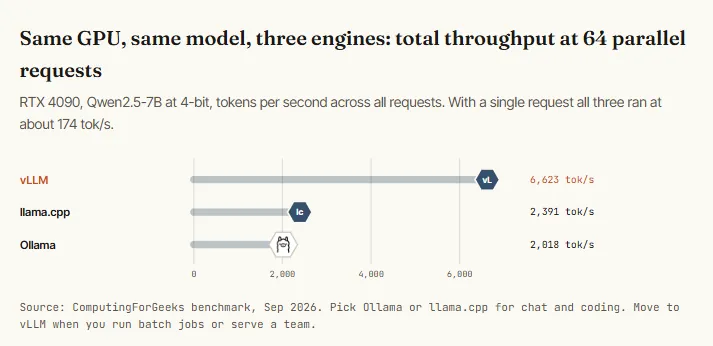
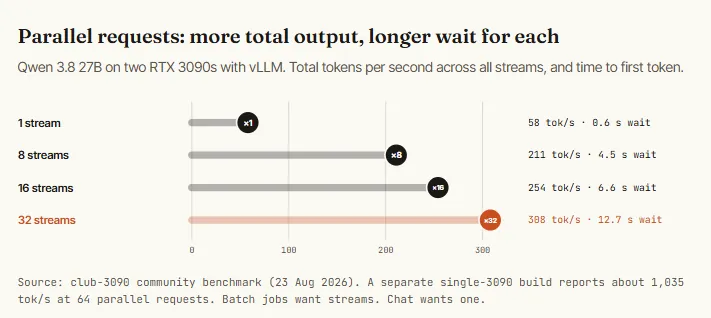
Does the engine change speed? For one user, no. For many requests at once, enormously.
08. Serve — turn the model into an API your tools can call
A model in a chat window is a toy. A model behind an API is infrastructure. Ollama already serves an OpenAI-compatible endpoint on port 11434, and an Anthropic-compatible one too, so most tools connect by changing a URL.
$ curl http://localhost:11434/v1/chat/completions \
    -H "Content-Type: application/json" \
    -d '{
      "model": "qwen3.8:27b",
      "messages": [
        {"role": "system", "content": "Answer in one sentence."},
        {"role": "user", "content": "What is memory bandwidth?"}
      ]
    }'
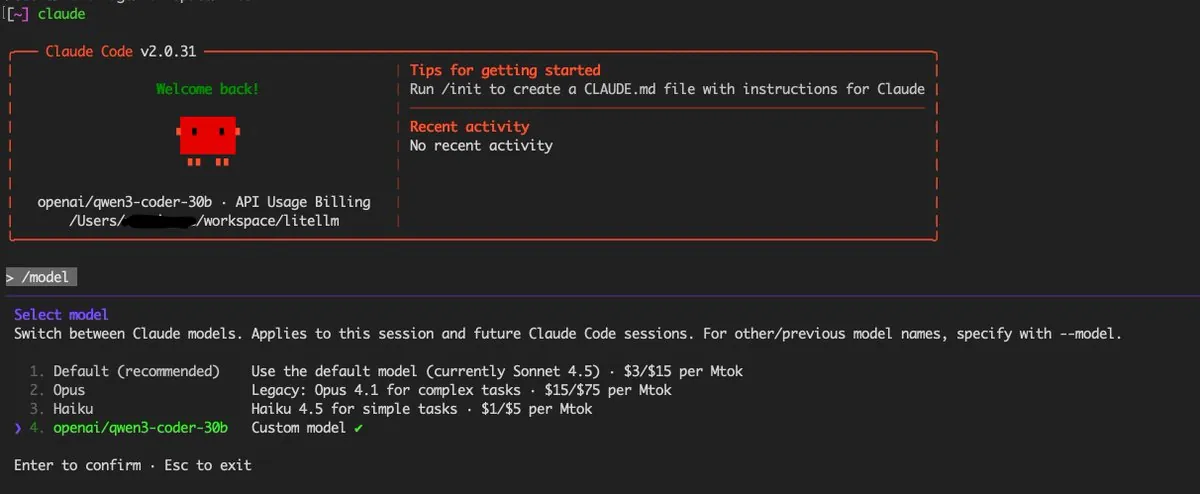
To point Claude Code at the local model, set two environment variables. Put them in the settings file so every session picks them up.
{
  "env": {
    "ANTHROPIC_BASE_URL": "http://localhost:11434",
    "ANTHROPIC_AUTH_TOKEN": "ollama"
  },
  "model": "qwen3.8:27b"
}
What does not carry over: Ollama's Anthropic-compatible API supports messages, streaming, tool calls, vision and thinking. It does not support prompt caching, token counting, forced tool choice, PDFs or batches. Expect a working coding agent with rougher edges, and give it at least 64K of context.
Pro nuance: coding agents rewrite the start of the prompt between turns, which can throw away the server's cache and make every turn reprocess the whole context. Unsloth documented the cause and the fix for local models. Check it before you blame your GPU for slow turns.
09. Small LLMs — give the boring agent steps to a tiny model
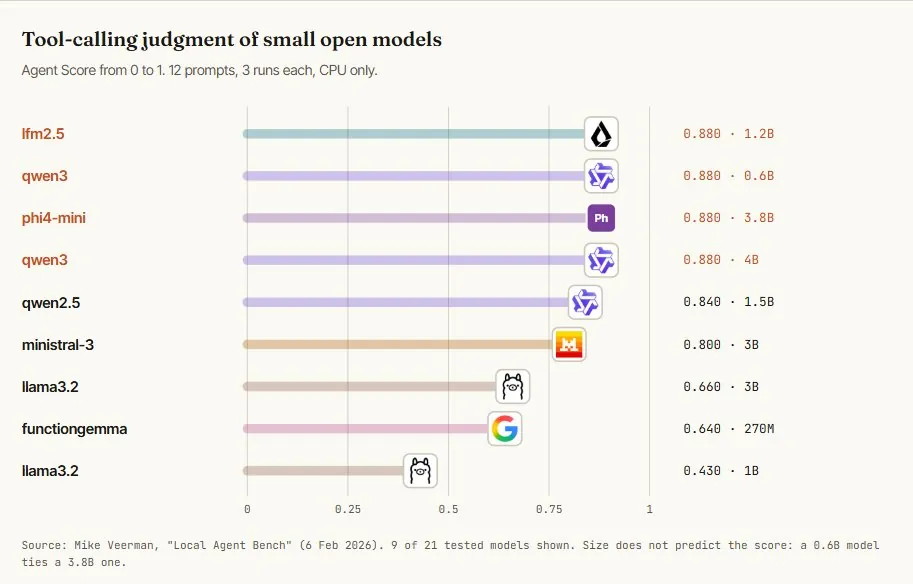
Most calls inside an agent are not hard. Decide which tool to use. Pull three fields out of a page. Say whether this message needs a human. NVIDIA Research argued in 2025 that these repetitive, scoped calls belong to small models, and estimated that serving a 7B model is 10 to 30 times cheaper than a 70B to 175B one. In their case studies, 40% to 70% of an agent's LLM calls could move to a small model.
A February 2026 benchmark ran 21 small open models on tool-calling judgment, on a laptop CPU with no GPU. The score rewards calling the right tool and, just as much, not calling one when it should stay quiet.
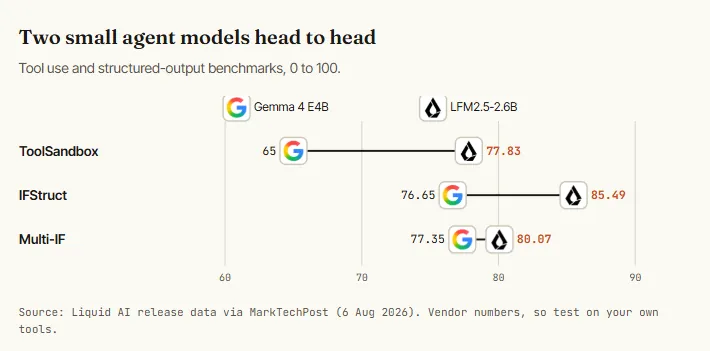
Newer small models push this further. Liquid AI's LFM2.5-2.6B (August 2026) runs in under 2.5 GB with a 131K context, at a reported 220 tokens per second on an M5 Max and 30 on a phone.
Route the easy calls to a small model and keep the frontier only for what needs it. This router is the whole idea in one file.
from openai import OpenAI
import json

local = OpenAI(base_url="http://localhost:11434/v1", api_key="ollama")

ROUTER_PROMPT = """You are a router. Read the task and reply with JSON only:
{"lane": "small" | "big" | "cloud", "reason": "<max 12 words>"}

small = classify, extract, tag, rewrite, yes/no decisions, one tool call
big   = write or edit code, multi-step tasks, anything with private files
cloud = novel architecture decisions, tasks that failed twice locally

If unsure between two lanes, pick the cheaper one."""

MODELS = {"small": "qwen3:4b", "big": "qwen3.8:27b"}

def route(task: str) -> str:
    verdict = local.chat.completions.create(
        model=MODELS["small"],
        messages=[{"role": "system", "content": ROUTER_PROMPT},
                  {"role": "user", "content": task}],
        response_format={"type": "json_object"},
        temperature=0,
    )
    lane = json.loads(verdict.choices[0].message.content)["lane"]
    if lane == "cloud":
        return call_frontier_api(task)        # your paid model, used rarely
    reply = local.chat.completions.create(
        model=MODELS[lane],
        messages=[{"role": "user", "content": task}],
    )
    return reply.choices[0].message.content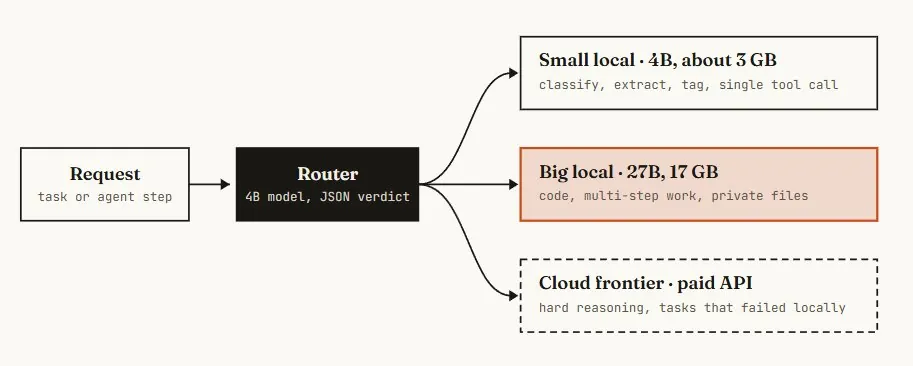
10. Measure — benchmark your own setup, then go hybrid
Speed numbers from X are measured on someone else's machine, quant, context length and engine. Yours will differ. Two commands give you the truth.
# Ollama: prints prompt eval rate (prefill) and eval rate (decode)
$ ollama run qwen3.8:27b --verbose "Explain KV cache in 200 words."

# llama.cpp: repeatable benchmark for a GGUF file
$ llama-bench -m Qwen3.8-27B-Q4_K_M.gguf -ngl 99

# is the model fully on the GPU? look for "100% GPU"
$ ollama ps
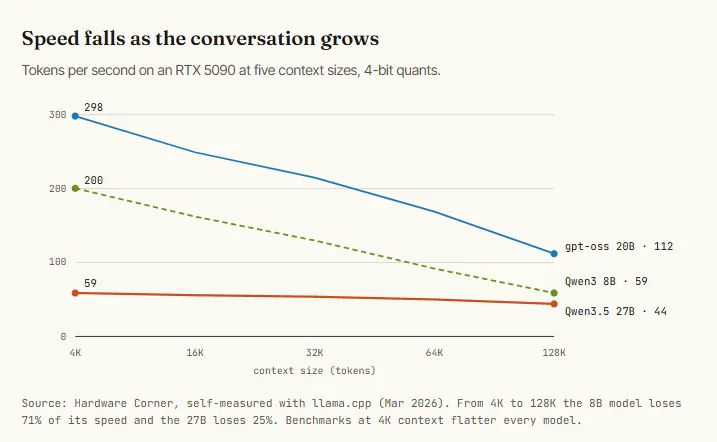
Read the result against this scale: 20 tokens per second is usable, 50 is comfortable, and 100 or more is faster than most cloud APIs feel. Track two numbers, because they fail differently.
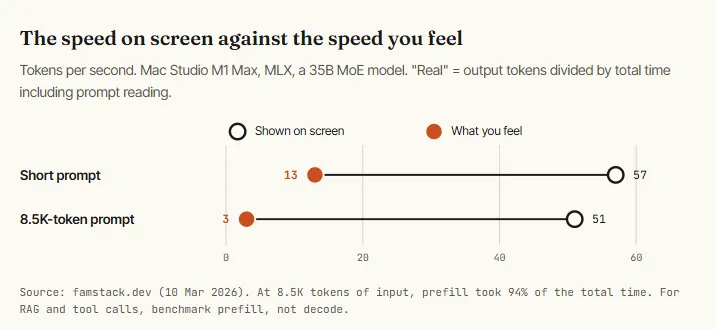
Test quality on your own work too. Keep a file of ten tasks you already know the right answer to, and run it against every model and quant you consider.
Run each task below. For every task print: the answer, then a line
"SELF-CHECK:" stating one way the answer could be wrong.

1. [real bug from my repo + the failing test output]
2. [a contract clause] -> extract parties, dates, amounts as JSON
3. [20 support messages] -> label each: billing / bug / feature / other
4. [a screenshot of a dashboard] -> list every number you can read
5. [a 30-page doc] -> answer three questions whose answers are on page 24
...
10. A task where the right answer is "I can't tell from this input."
Six workloads for this week
Setup is done. These are six jobs to hand the stack right away, ordered from five minutes to one evening. Each one is a complete file you can paste. Jobs B, C and D are short Python scripts. Run this once before you start: it creates a private folder for the Python packages so nothing else on your computer is touched.
A. Commit messages written by a 3 GB model. The smallest useful job. A git hook reads your staged diff and drafts the message before the editor opens. It runs in a second or two and never leaves the laptop.
#!/bin/sh
# keep messages you typed yourself (-m, merge, amend)
[ -n "$2" ] && exit 0
DIFF=$(git diff --staged | head -c 12000)
[ -z "$DIFF" ] && exit 0

printf 'Write a git commit message for this diff.
Line 1: imperative summary, max 60 characters.
Then a blank line, then up to 3 bullets: what changed and why.
No preamble. No code fences.

%s' "$DIFF" | ollama run qwen3:4b --think=false > "$1"qwen3:4b, about 3 GB. Thinking is switched off because a commit message does not need it and the hook should feel instant.
B. Batch triage — label a thousand tickets overnight. Classification is where local models pay off fastest: thousands of small calls, no per-token bill, data that should not leave the building.
import asyncio, csv, json
from openai import AsyncOpenAI

client = AsyncOpenAI(base_url="http://localhost:11434/v1", api_key="ollama")
limit = asyncio.Semaphore(8)

PROMPT = """Label this support ticket. Reply with JSON only:
{"category": "billing" | "bug" | "feature" | "account" | "other",
 "urgency": 1 | 2 | 3,
 "needs_human": true | false,
 "summary": "<max 15 words>"}
urgency 3 = money lost, data lost, or cannot log in.
If the ticket is unclear, category is "other" and needs_human is true."""

async def label(row):
    async with limit:
        r = await client.chat.completions.create(
            model="qwen3:4b", temperature=0,
            response_format={"type": "json_object"},
            messages=[{"role": "system", "content": PROMPT},
                      {"role": "user", "content": row["text"]}])
        return {**row, **json.loads(r.choices[0].message.content)}

async def main():
    rows = list(csv.DictReader(open("tickets.csv")))
    done = await asyncio.gather(*(label(r) for r in rows))
    with open("labeled.csv", "w", newline="") as f:
        w = csv.DictWriter(f, fieldnames=done[0].keys())
        w.writeheader(); w.writerows(done)

asyncio.run(main())
Spot-check 50 labels by hand before you trust the other 950. If the small model disagrees with you on more than 5, rerun only the needs_human rows through the 27B model.
C. Private documents — ask questions across your own files. Contracts, client notes, research. The files are embedded once, then every question pulls the five most relevant chunks into the prompt. Forty lines, no vector database.
import pathlib, numpy as np, ollama

docs   = [p.read_text() for p in pathlib.Path("notes").glob("**/*.md")]
chunks = [d[i:i + 1200] for d in docs for i in range(0, len(d), 1000)]

def embed(texts):
    v = np.array(ollama.embed(model="nomic-embed-text", input=texts)["embeddings"])
    return v / np.linalg.norm(v, axis=1, keepdims=True)

index = embed(chunks)                        # run once, cache to disk if large

SYSTEM = """Answer only from the CONTEXT. After the answer, quote the exact
sentence you relied on. If the context does not contain the answer, reply
"Not in these documents." Do not use outside knowledge."""

def ask(question, k=5):
    top = np.argsort(index @ embed([question])[0])[-k:][::-1]
    context = "\n---\n".join(chunks[i] for i in top)
    r = ollama.chat(model="qwen3.8:27b", messages=[
        {"role": "system", "content": SYSTEM},
        {"role": "user", "content": f"CONTEXT:\n{context}\n\nQUESTION: {question}"}])
    return r["message"]["content"]

print(ask("What notice period did we agree with the landlord?"))
People who run this daily say the same thing: retrieval is less magical than it looks, and most of the work is tuning chunk size and what you show the model. Start with the 1,200-character chunks above, then test with ten questions you know the answers to.
D. Vision — turn a photo of an invoice into JSON. Qwen 3.8 27B reads images natively. Give it a schema and it returns structured data, which makes receipts, screenshots and scanned forms a local job.
import json, ollama

SCHEMA = {
  "type": "object",
  "properties": {
    "vendor":   {"type": "string"},
    "date":     {"type": "string", "description": "YYYY-MM-DD"},
    "currency": {"type": "string"},
    "total":    {"type": "number"},
    "line_items": {"type": "array", "items": {"type": "object", "properties": {
        "name": {"type": "string"}, "amount": {"type": "number"}}}},
    "unreadable": {"type": "array", "items": {"type": "string"}}
  },
  "required": ["vendor", "date", "currency", "total", "unreadable"]
}

r = ollama.chat(
    model="qwen3.8:27b",
    format=SCHEMA,
    options={"temperature": 0},
    messages=[{"role": "user",
               "content": "Extract the invoice fields. List any field you "
                          "could not read clearly under 'unreadable'. Never guess a number.",
               "images": ["invoice.jpg"]}])

print(json.loads(r["message"]["content"]))
The unreadable field is the important one. Without an explicit place to say “I could not read this”, a vision model fills the gap with a plausible number. Check that totals equal the sum of line items in code, not in the prompt.
E. Coding agent — give it one skill and one MCP server. With Claude Code pointed at the local model (Step 8), add two small files. A skill teaches the agent one procedure it should follow exactly. An MCP server gives it one tool. Local models do best with narrow, explicit instructions, so keep both short.
---
name: local-review
description: Review the staged diff before a commit. Use when the user says
  "review", "check my changes", or asks whether something is safe to commit.
---
# Local review

1. Run `git diff --staged`. If it is empty, say so and stop.
2. Read every changed file in full, not only the diff hunks.
3. Report in this order: bugs, missing tests, risky changes. Max 10 lines.
4. For each bug give file:line and a one-line fix. Do not edit any file.
5. If you are not sure something is a bug, label it "unsure".
6. End with one word on its own line: COMMIT or HOLD.
{
"mcpServers": {
"docs": {
"command": "npx",
"args": ["-y", "@modelcontextprotocol/server-filesystem", "./docs"]
}
}
}Every tool definition is tokens the model reads on every turn. On a local model that is prefill time you feel. One or two MCP servers is the right number. Ten is why your agent takes 40 seconds to say hello.
F. Night shift — a digest that is waiting when you wake up. This is the workload that justifies owning hardware: a job that runs while you sleep, every day, at zero marginal cost. Here it reads yesterday's commits and open TODOs and writes a morning brief.
#!/bin/sh
cd ~/code/myrepo || exit 1
{
  echo "COMMITS SINCE YESTERDAY:"
  git log --since=yesterday --pretty='%h %an %s'
  echo
  echo "OPEN TODOS:"
  grep -rn "TODO" src | head -50
} | ollama run qwen3.8:27b --think=false "Write a morning digest in markdown.
Sections: Shipped yesterday / Looks unfinished / Do first today (3 items).
Use only facts from the input. If the input is empty, write 'Nothing new.'" \
  > ~/digests/$(date +%F).md

# schedule it: crontab -e
# 30 6 * * * ~/bin/nightly-digest.sh
Swap the input and the same twenty lines become an inbox summary, a competitor-changelog watcher, or a transcript cleaner. The pattern is always: collect text with shell tools, pipe it to the model with a strict output format, write a file.
Conclusion
Rent for a weekend. Buy for a workload. Route everything.
The first local model you run will be slower and a little less smart than the one you rent. It will also be yours: no cap, no meter, no data leaving the room. Start with one command on the machine you already own, measure it, and let the numbers tell you what to buy.
Source: Movez (@0xMovez), “How to set up your first Local LLM in 10 Steps (Full-course)”, X article, 2026-10-04, x.com/0xMovez/status/2106761689123139973.
Source:Movez (X)https://x.com/0xMovez/status/2106761689123139973