Build a Long-Running Agent With an Open Source Harness
Follow a TrueForge web research agent from model and MCP calls through sandboxed skills, isolated subagents, approval gates, compaction, and replayable durable events.
Sam Altman recently wrote one line that captures where agent engineering is heading: “also, a reason to favor open-source harnesses.”
Most attention in AI still goes to the model: which model reasons better, which one writes better code, how large its context window is, or how well it performs on a benchmark. But once you ask an agent to work for several minutes, search across sources, execute code, delegate work, and take dozens of steps, the model becomes only one part of what keeps the task running.
A raw model has no persistent execution loop. It does not automatically know how to call tools, decide which context to retain, isolate code execution, recover from a dropped connection, or pause before a sensitive action. Those responsibilities belong to the runtime around the model.
That runtime is the agent harness.
This article follows a web research agent through one complete run to explain how a long-running agent executes: the model loop, MCP tools, skills, sandbox execution, subagents, context compaction, approval checkpoints, and the event stream that makes a session durable.
What an agent is actually made of
A language model is stateless between API calls. You send it context, it produces an output, and the call ends. It has no built-in concept of a task that must continue across twenty or fifty separate calls.
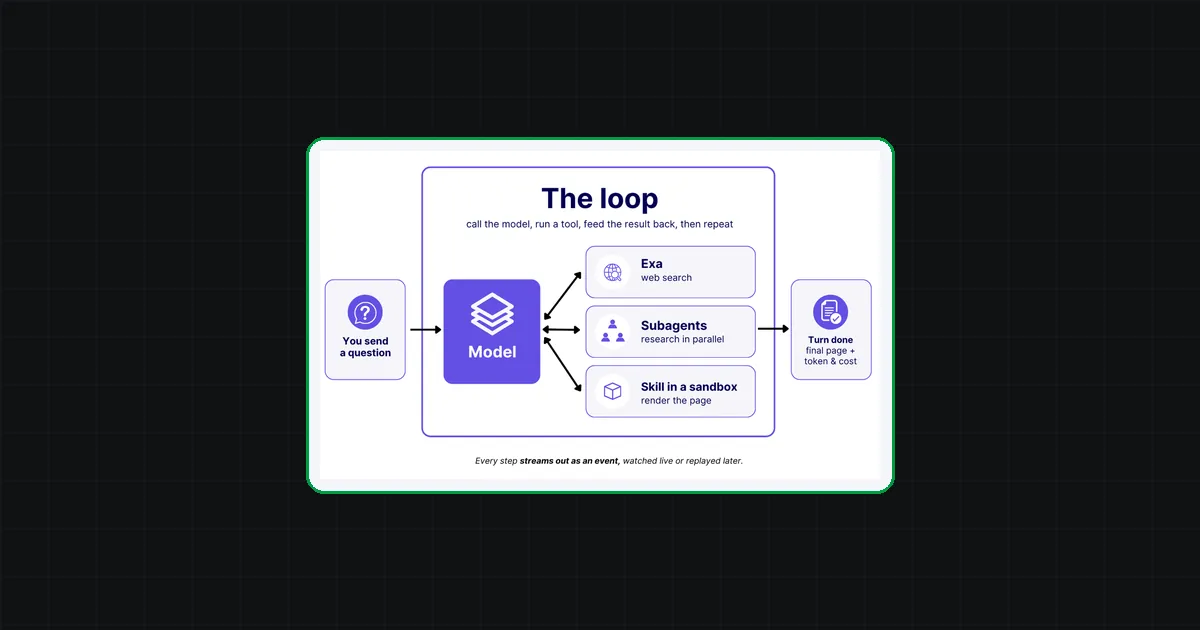
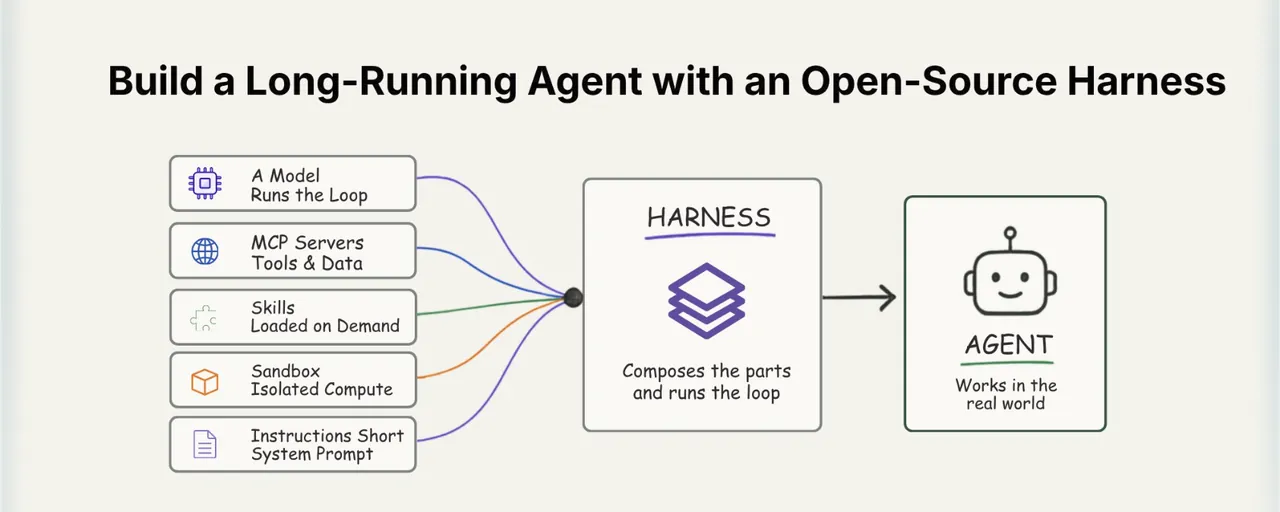
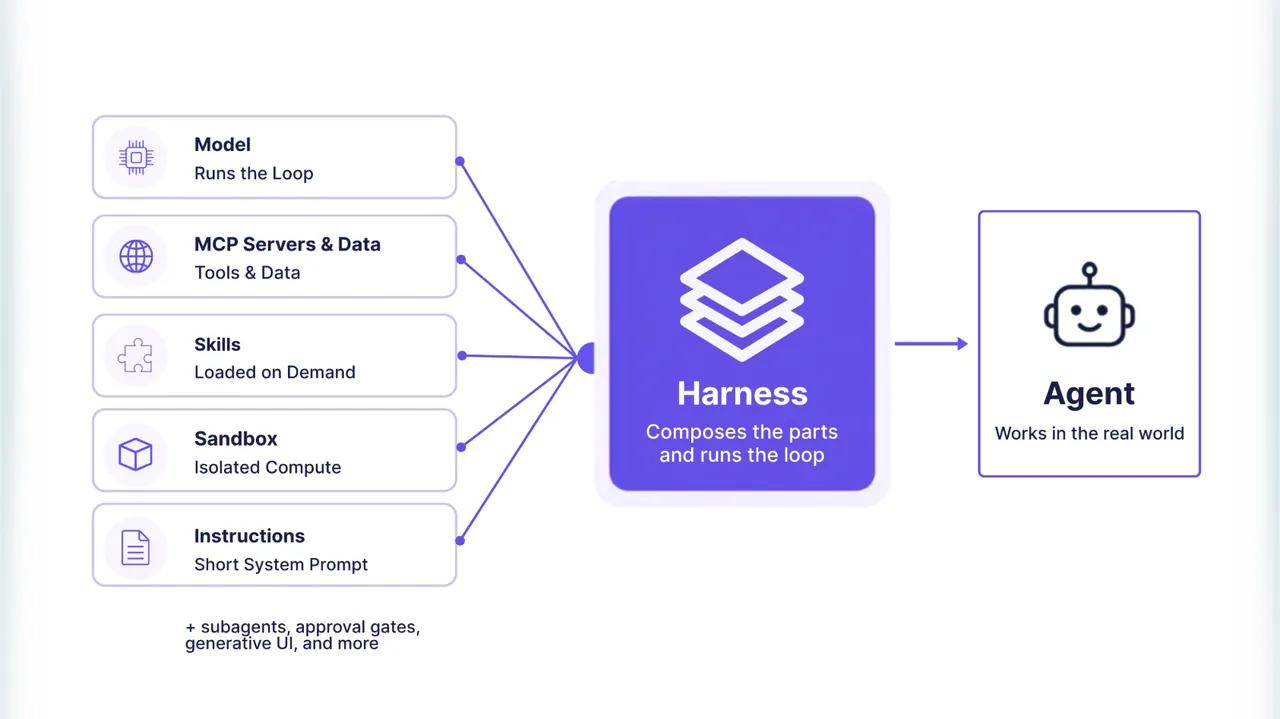
The harness wraps the model in an execution system. At its simplest, the harness repeatedly calls the model, gives it access to tools, feeds tool results back into context, and decides when the task is complete.
A useful agent needs more than that loop. It usually has four core building blocks:
- A model for reasoning and deciding what to do next.
- MCP servers or other tools for reading and changing external systems.
- Skills that describe how a particular kind of task should be performed.
- A sandbox where generated code can run and files can be created without sharing the agent server itself.
Other capabilities become increasingly important as a run gets longer: subagents for parallel work, context management to keep the model window under control, approval checkpoints before sensitive actions, and persistent sessions so the task does not disappear when the client disconnects.
To make the architecture concrete, this walkthrough uses TrueForge, an open-source agent harness from TrueFoundry.
Setting up the research agent
We will build a small web research agent on TrueForge and then follow what happens inside the harness when it runs.
The agent has one job: given a research question, it searches the web, investigates different parts of the problem in parallel, and turns the findings into one interactive page with sources cited.
The agent only needs four building blocks: a model, an MCP connector for web search, a skill that defines how the final artifact should be created, and a sandbox where the agent can execute code and write files.
Start the local server with:
npx @truefoundry/trueforge@latestThen open http://localhost:8790. The agent can be assembled directly in the UI.
- Add a model. Open Settings → Models, choose a provider, add an API key, and enable the model the agent should use.
- Connect Exa. Open Settings → Connectors, find Exa, and connect it. This gives the agent web search through MCP.
- Enable the skill. Under Settings → Skills, enable
web-artifacts-builder. It contains the procedure the agent follows to turn research into an interactive one-page brief. - Turn on a sandbox. The skill executes inside a sandbox rather than directly on the agent server. On macOS or Linux, including WSL, TrueForge can use its built-in local sandbox. On native Windows, connect a Daytona sandbox instead.
- Compose and save the agent. Return to the chat, choose the model, enable Exa and
web-artifacts-builder, and keep Dynamic sub-agents enabled. Send a test question to confirm that the agent can search, delegate research, and render the final artifact. Then save the configuration as an agent.
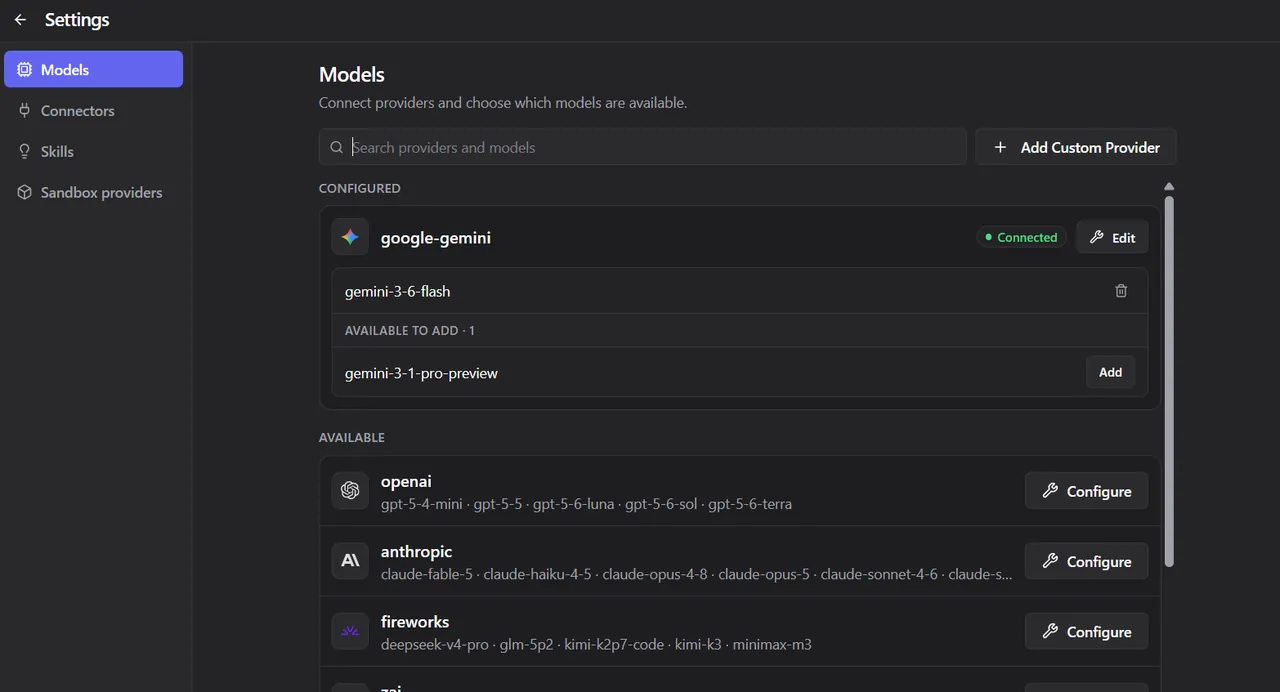
Once the agent is saved, the model, tools, skill, and sandbox remain attached to that configuration. An application only needs to reference the saved agent instead of rebuilding the entire setup on every run.
At this point, the agent works. The more interesting question is what the harness does after it receives a task.
What happens when the agent starts running
When a research question arrives, the harness creates a new turn and calls the model with the task, the relevant instructions, and the capabilities currently available to it.
The model does not receive the question and complete the entire workflow in one response. It usually decides on one action first. In this case, that action may be searching for information through Exa.
The execution therefore begins like this:
- The model receives the task.
- It decides which tool or capability it needs.
- The harness executes that action.
- The result is returned to the model.
- The model reasons over the result and decides what to do next.
- The cycle repeats until the task is complete.
At its core, this is still an execution loop. You could write a basic version in an afternoon: call the model, inspect whether it requested a tool, run the tool, append the result, and call the model again.
The difficulty is not writing the loop. The difficulty is making the loop survive a real task. What happens if the model keeps calling tools forever? What happens when one search returns 20,000 tokens? What happens when three research branches can run in parallel? What happens when the agent wants to execute a destructive action? What happens if the browser disconnects halfway through the run?
Those are harness problems. The research agent encounters several of them during a single run.
MCP connects the agent to the web
The model itself cannot search the live web. It needs an external tool.
In this setup, Exa is exposed through MCP. When the model decides it needs to search, the harness sends the corresponding MCP request, receives the result, and makes that information available to the next model call.
This is simple for a small agent with one or two tools. Production agents often have many MCP servers and potentially hundreds of tools.
That creates a context problem before the agent has even started working. Every tool comes with a description and schema explaining what it does and which arguments it accepts. If the harness inserts every full definition into every model request, a large part of the context window is consumed by tools that may never be used.
Progressive disclosure solves this problem. Instead of loading everything up front, the agent initially sees enough information to discover that a capability exists. The full definition is loaded only when the model actually needs that tool.
The same principle applies throughout a long-running agent: the model should have access to everything it may need without carrying all of it inside the active context at the same time.
Skills give the agent procedures
MCP tools describe what an agent can do. Skills describe how it should perform a particular kind of task.
For this research agent, web-artifacts-builder contains instructions for taking the research, organizing it, and turning it into the final interactive artifact.
The distinction matters because the entire procedure does not need to live inside the system prompt. Imagine an agent with thirty capabilities: writing a report, reviewing code, creating a dashboard, analyzing logs, researching the web, and so on. Putting the complete instructions for all thirty workflows into every model call would create the same context problem as loading every tool schema.
Instead, the agent knows which skills are available and loads a detailed procedure only when it becomes relevant. This keeps the base context smaller while still allowing the same agent to perform many kinds of work.
In this run, the agent loads the artifact-building skill after collecting research, then uses it to decide how the final page should be generated.
But generating that page requires more than language-model reasoning. It needs somewhere to execute code and create files.
The sandbox is where execution happens
A model can generate code, but it should not run that code directly inside the process that hosts the agent.
The sandbox gives it an isolated environment for execution. For this research agent, the sandbox is where the skill processes search results, creates files, executes code, and assembles the final interactive page.
This separation is also useful for context management. Suppose Exa returns a very large search response. One option is to paste all of it into the conversation and make the model carry those thousands of tokens through every future step. That works for a while, but it scales badly.
A better approach moves the heavy data somewhere else. The agent processes the raw result inside the sandbox, writes large outputs to files, and returns only a compact summary or reference to the model. The information is still available if it needs another look, but it no longer occupies space in every model request.
This matters because once the agent researches several things in parallel, context becomes the main constraint.
Where long-running agents start breaking: context
A short run is easy to reason about because there is little history. A long run keeps accumulating information with every step: model responses, tool outputs, search results, skill instructions, files, previous decisions, and results returned by other agents.
Eventually, the system has to answer a difficult question: what does the model actually need to see right now?
Two kinds of context are involved. The first is context we intentionally give the model: the system prompt, tool definitions, skill instructions, files, and task state. The second is context the run generates on its own: search results, intermediate outputs, old messages, tool responses, and reasoning from earlier steps.
The second category grows continuously. TrueForge uses four techniques to prevent all of it from accumulating inside the parent model context.
Progressive disclosure
Tools and skills do not need to be loaded in full before they are used. The agent discovers capabilities first and pulls in detailed definitions later.
Code Mode
Large tool results can be processed programmatically rather than sent raw to the model. If a search returns hundreds of records, the agent can filter or transform them in code and send only the useful output back into context.
Large-result offloading
If a result is too large to keep in the conversation, it is written to a file in the sandbox. The model receives a preview or reference instead of carrying the full payload through the rest of the run.
Compaction
Even with those techniques, the conversation eventually grows. When the context crosses a configured threshold, older parts of the session can be summarized into a smaller representation. The agent loses some verbatim detail from the early steps but keeps enough state to continue the task.
All four techniques share one goal: preserve the information required for reasoning without forcing the model to reread the full execution history on every step.
There is also another way to stop context from growing: do not put the work in the parent context in the first place.
Subagents isolate parallel research
The web research agent is a useful example. Suppose the user asks it to compare three developer tools.
The simplest implementation researches tool one, then tool two, then tool three inside the same agent context. By the time the research finishes, the parent conversation contains every query, every page read, every tool response, and every intermediate note from all three branches.
Instead, the harness can create a separate subagent for each item. Each subagent receives its own context and works independently. It searches the web, reads the relevant pages, reasons over the findings, and returns a compact conclusion to the parent.
Parent agent
→ Subagent A researches tool A
→ Subagent B researches tool B
→ Subagent C researches tool C
The parent only needs the output, not every step from the child research process. Each child returns its conclusion, and the parent performs the final comparison.
For this research agent, Dynamic sub-agents enable exactly this fan-out. The work can happen in parallel, and the parent context stays smaller because it receives conclusions instead of complete research histories.
But subagents are not automatically better. If a task fits comfortably inside one context window, splitting it into several independent agents adds orchestration and more opportunities for failure. Subagents become useful when the work is genuinely parallel or when the child task would otherwise dump too much information into the main context.
Approval gates belong between reasoning and action
So far, this agent only reads information and creates files inside its sandbox. It performs no dangerous external action.
Imagine replacing Exa with tools that can merge a GitHub pull request, modify infrastructure, send a Slack message, or update a production database. The normal execution loop would look like this:
Model decides to call tool → Harness executes toolFor sensitive actions, that gives the model too much authority. The harness needs another state:
Model decides to call tool → Harness pauses → Human reviews → Harness continues or stopsTrueForge enforces approval checkpoints from metadata attached to each tool. If a tool is marked as requiring approval, the run stops before the call executes and shows the exact tool and arguments to the user.
This differs from putting “ask me before deleting anything” inside the system prompt. A prompt is still an instruction the model has to follow. An approval gate is a runtime rule.
The model cannot reason its way around the gate because it is not choosing whether to obey. The harness itself refuses to execute the tool until the checkpoint is resolved.
The research agent never triggers an approval gate because its external tools are read-only. If a write-capable GitHub tool were attached, the same loop could pause immediately before creating or modifying something.
The run should survive the client
One final problem becomes obvious only when agents run for several minutes or longer: what happens if the user closes the browser?
A chatbot request usually finishes quickly enough that the client connection and the model response can be treated as one interaction. A long-running agent cannot make that assumption. Execution must exist independently of the UI watching it.
TrueForge stores each session as an ordered stream of events. As the model reasons, tools execute, subagents run, approvals occur, and results return, those events become part of the persistent session.
If the browser disconnects, the run does not disappear with it. The server continues executing the task. When the client reconnects, it can resume the stream or retrieve the events it missed.
The same design produces a replayable trace. If the research agent returns a bad answer, you can inspect how it reached that answer: which search it performed, which tool returned unexpected data, what a subagent concluded, and what the parent did with that conclusion.
This becomes increasingly important as runs become longer. The final response tells you what happened. The event stream tells you why.
The full anatomy of the run
Now the entire execution can be assembled into one path.
The user sends a research question, and the harness starts a turn. The model decides what to do first, discovers the available tools, and calls Exa through MCP. Search results return, but large outputs do not have to remain in the main model context.
If the problem can be split into independent branches, the harness creates subagents. Each one researches its part in an isolated context and sends a compact result back to the parent.
When the findings must become the final artifact, the agent loads the relevant skill. Code runs inside the sandbox, where the agent can process data and create files without executing directly on the server.
As the session grows, unused tool definitions stay unloaded, large results are offloaded, and older conversation history can be compacted. If the agent eventually requests a sensitive write action, the runtime can stop before executing it and wait for approval.
Throughout the process, every step is persisted as an event. The task can continue if the client disconnects, and the full execution can be inspected afterward.
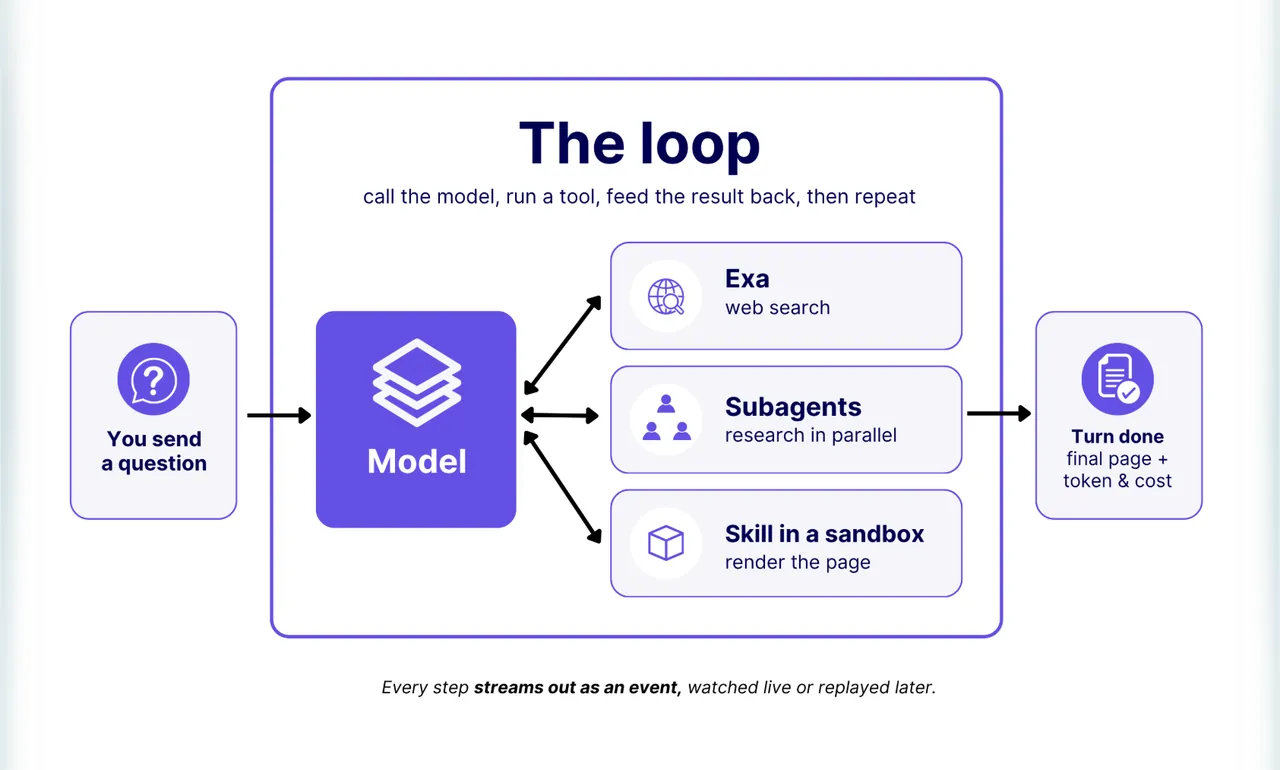
That is what turns the simple model-tool loop into a long-running agent. The model still performs the reasoning, but most reliability work happens around it: deciding what the model sees, where code runs, how parallel work is isolated, when execution stops, and whether the session survives long enough to finish.
This is why the harness layer matters more as agents move beyond short demos. TrueForge packages these runtime pieces into an open-source, vendor-neutral harness instead of requiring teams to rebuild the same infrastructure around every agent.
The web research agent is one example. The underlying execution model remains largely the same for a codebase onboarding agent, a dependency auditor, an incident triage bot, or another long-running workflow. What changes is the model, tools, and skills attached to the agent. The loop, context management, sandbox, approval checkpoints, and durable session remain.
The companion repository contains the TypeScript driver and setup instructions for invoking the saved agent from code and following the same workflow:
Companion driver and setup guide
TrueForge itself is available at github.com/truefoundry/trueforge.
Source: “Build a Long-Running Agent With an Open Source Harness” by Sumanth, X Article, August 25, 2026. Figures reproduced from the original article.
Source:X Article / Sumanthhttps://x.com/Sumanth_077/status/2092242081154847137