OPEN SOURCE DEEP DIVE
ElectroPup: a 12-DoF 3D-Printed Open-Source Quadruped
ElectroPup is a 4.5 kg, 12-DoF DIY quadruped: twelve MG4010E-i10v3 CAN BLDC actuators split into four per-leg CAN segments, a Raspberry Pi 5 for compute, and a single ~7,700-line pure-Python service with no ROS in the stack. The repository publishes OnShape CAD, two KiCad v8 boards, a bill of materials, measured weights and power draw (21.6 W suspended, 33.8 W standing), plus MuJoCo simulation, a React Native/Expo browser UI, four Bezier-foot gaits, and a full build guide. The author also documents known gaps: no license file, no contact sensing, and a simulation model without approximate masses or inertias.
A robot dog you can actually build
ElectroPup is a DIY quadruped from Reuben Struwig that answers a specific question: how small and how cheap can a walking robot dog get before you lose the parts of it that make it worth building? The answer here is a 4.5 kg, 12-degree-of-freedom machine driven by twelve MG4010E-i10v3 CAN BLDC actuators, computed on a Raspberry Pi 5, and controlled by a single Python service with no ROS anywhere in the stack. The bill of materials in docs/bom.ods totals roughly USD 2,026, of which USD 1,608 is motors alone at USD 134 each. Actuation is 79 percent of the build cost, which is the same economic shape you see in every hobby quadruped and is exactly why this project documents the motor choice so carefully.
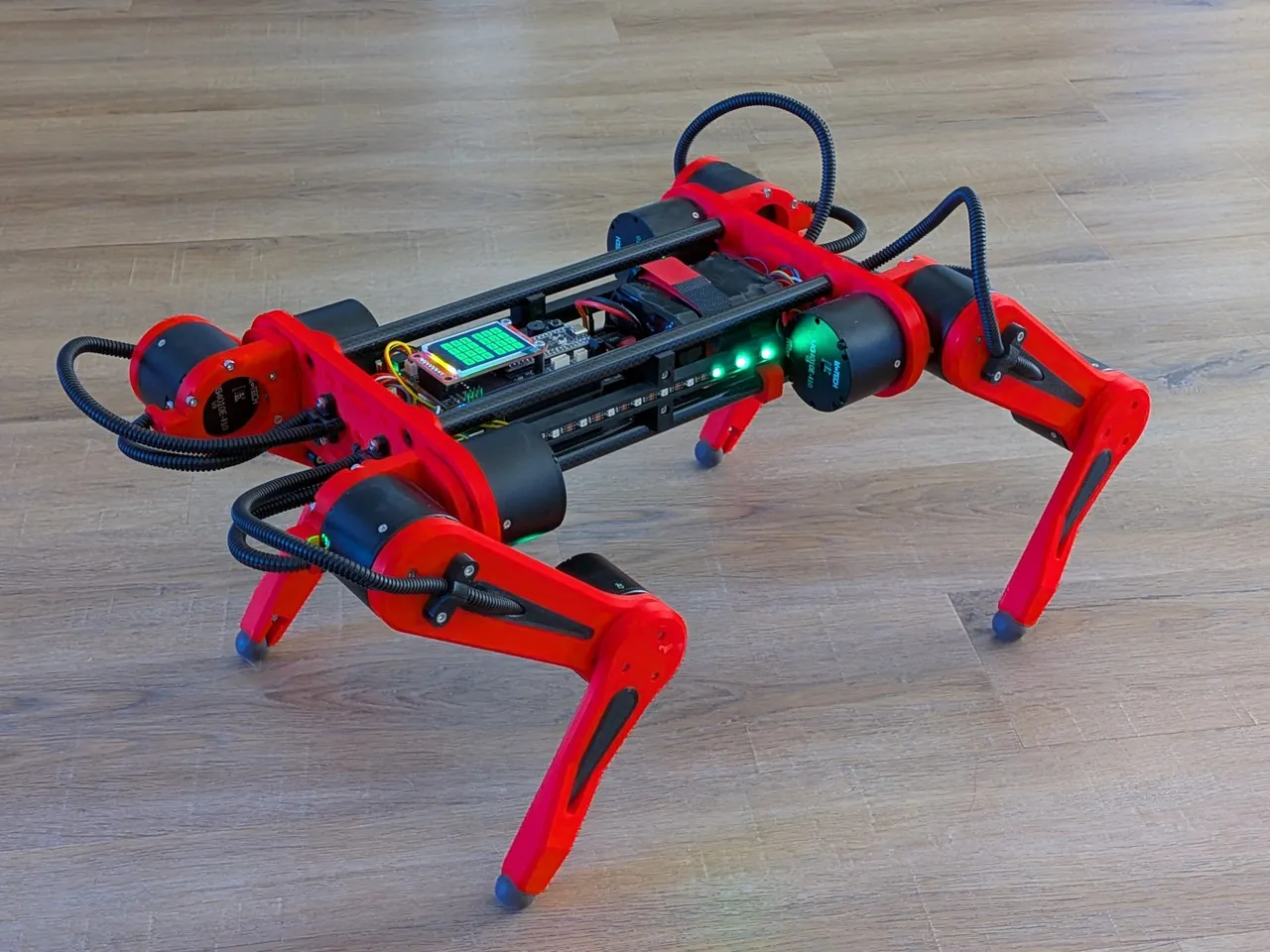
The repository is unusually complete for a hobby build. It ships the OnShape CAD documents (assembly, legs, body, hips, tools, parts, PCB, NeoPixel mounts), two KiCad v8 board designs with manufacturing outputs, a printed-parts list with time and filament estimates, a measured weights spreadsheet, a power calculation spreadsheet, a full setup guide, and around 7,700 lines of Python covering motion planning, inverse kinematics, motor drivers, MuJoCo simulation, and a browser UI. Everything needed to reproduce the robot is in the tree. The one thing missing is a license file, which matters if you intend to redistribute hardware or derivatives: as published, the repo has no explicit license at all.
Motors, CAN topology, and a 70 Hz bus
Each leg has three LingKong MG4010E-i10v3 actuators: abduction, hip, knee. The motor is rated at 2.5 N·m continuous and 4.5 N·m peak, accepts 7.4-32 V, draws 3.5 A rated, peaks at 140 W, carries a 1:10 planetary reducer, and reports an 18-bit motor-side encoder plus a 14-bit output-side encoder. It is 53 mm in diameter, 41 mm tall, and weighs 238 g, which is why the twelve motors account for 2,856 g of the robot's measured 4,312.6 g total in docs/weights.ods. Two thirds of the robot's mass is actuation.
The author lists the motor's pros and cons plainly, which is more useful than a spec sheet. In favor: configuration software that runs over non-proprietary USB-to-UART hardware, readable CAN documentation, a physical size that fits the frame, and a standard JST-ZH 6-position connector rather than a vendor-locked one. Against: the configuration tool is Windows only, the firmware is closed source, CAN cannot set every parameter (error thresholds and torque limits for compliance need UART), overseas sourcing complicates warranty, and some units are stiffer to turn by hand and draw slightly more current. The stated plan is to prioritize ODrive-compatible drivers in future builds.
| Motor parameter | Value | Where it is used |
|---|---|---|
| Rated / peak torque | 2.5 N·m / 4.5 N·m | Sets the load margin for standing and the RUN gait |
| Gear ratio | 1:10 | Output angle reported back over CAN |
| Encoders | 18-bit motor, 14-bit reducer | Position feedback for the 10 ms control loop |
| Bus | CAN at 1 Mbps, arbitration base 0x140 | src/system/motors/motors.py brings up socketcan at bitrate 1000000 |
| Per-channel load | 6 motors, ~70 Hz average update rate | Read encoder, set target angle and speed, fetch error states |
| Position-loop PID | Kp 5, Ki 5 (driver default 100) | Retuned in motor.py; RAM only, reapplied after every power cycle |
| Reply timeout | 50 ms, max 3 timeouts | Fault handling before a motor is marked unresponsive |
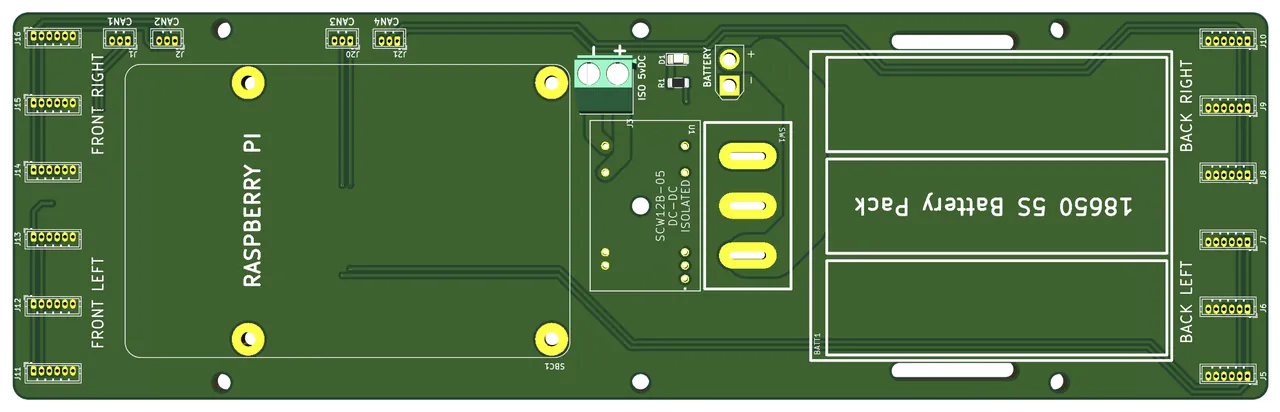
The bus topology is a design decision worth copying. The Power Carrier PCB creates four CAN networks, one per leg, and provides solder jumpers that merge the two front legs into a single network and the two rear legs into another. A Waveshare 2-channel isolated CAN HAT on the Raspberry Pi 5 then drives six motors per channel. Splitting by leg means a harness fault or a noisy joint degrades one leg instead of the whole robot, and it keeps each bus at half the traffic it would carry if all twelve motors shared one segment.
Frame, battery, and measured power
The frame borrows its idea from James Bruton's Open Dog 3: carbon fiber tube as the structural spine. Four tubes of 12 mm OD, 10 mm ID and 254 mm length are bonded into PLA inserts with superglue, and each insert takes an M5 brass threaded insert. The author notes the tubes could have been 250 mm, a far more common length, if the Power Carrier PCB were shortened by 2-4 mm or the hip plate were slotted by about 1 mm per end. Assembly detail is included because it is the kind of thing that ruins a build: attach the lower rods with PCB clips first, hold the hip plates down on a flat surface, and tighten each rod a little per cycle rather than torquing one at a time.
Leg geometry is fixed in frame_parameters.py: hip offset 0.036 m, upper leg 0.140 m, lower leg 0.140 m, body width 0.150 m, body length 0.338 m, foot length 0.338 m, foot width 0.261 m. Joint limits are ±45° abduction, -100° to 90° hip, ±180° knee. The author kept MIT Mini Cheetah dimensions in docs/design.txt as a sanity check that ElectroPup stays within common quadruped proportions.
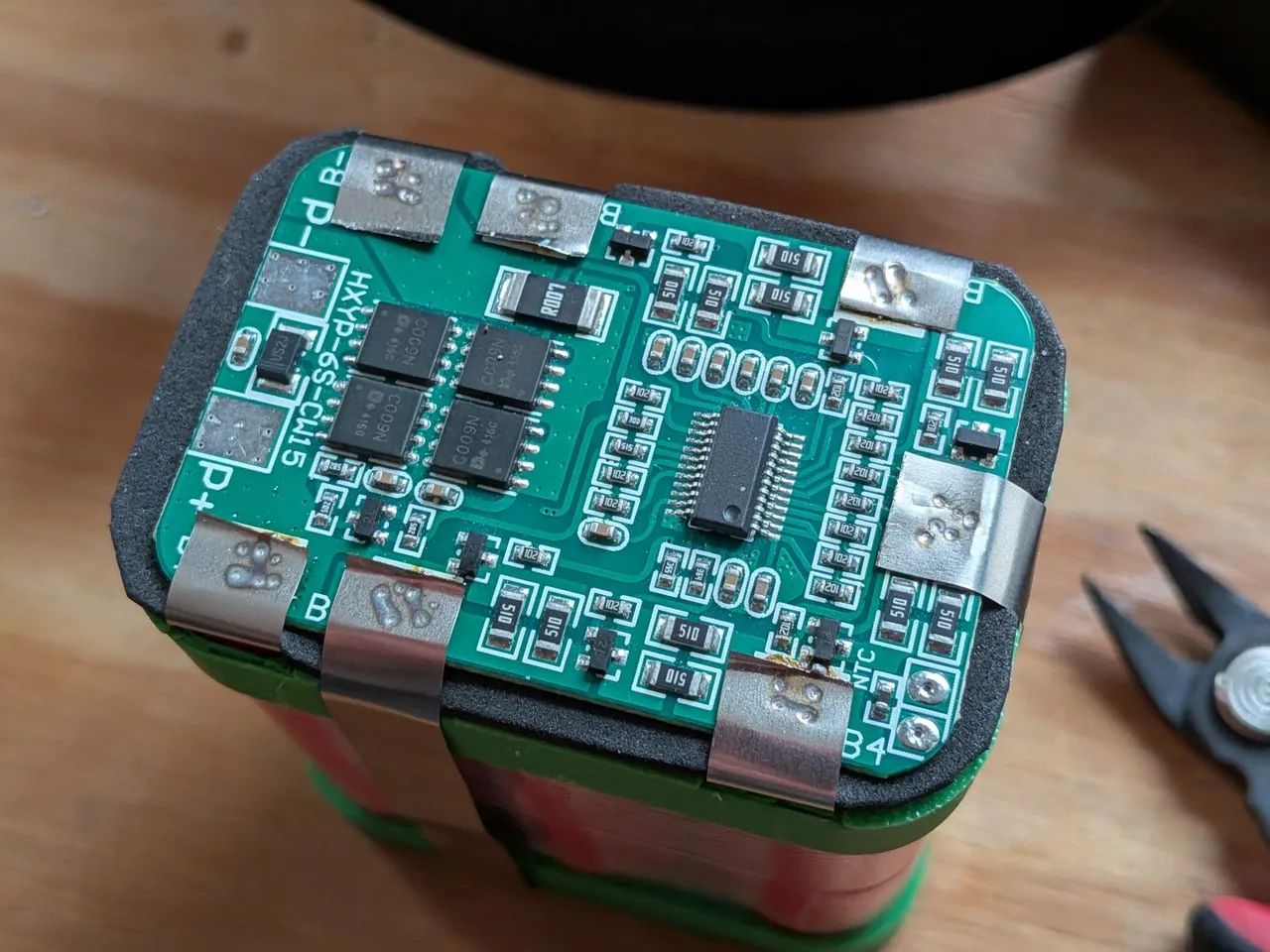
Power comes from a custom 6S1P pack of Sanyo 18650 cells at 3250 mAh each, roughly 72 Wh nominal (the notes compute 12.21 Wh per cell times six, 73.26 Wh) behind an HXYP-6S-CW15 balancing BMS. The build photos show the pack mid-assembly, and the author flags a genuine safety lesson: the terminal insulation rings were forgotten during fabrication and "really should be mandatory for any battery build." That candor is more valuable to a replicator than a clean hero shot.
| Operating condition | Draw at 20 V DC | Power |
|---|---|---|
| Suspended, motors disabled (abduction zero, legs at 45°) | 1.08 A | 21.6 W |
| Standing, motors enabled | 1.79 A | 33.8 W |
Holding a static stand therefore costs about 12 W over electronics idle. Against a 72 Wh pack that is the difference between an hour and a multi-hour session depending on how much the robot actually walks, and the measured number came in lower than the author's estimate. The stated consequence is interesting: because consumption is lower than expected, a larger frame with longer legs becomes feasible, which in turn would let the knee motor move to the hip and drive the lower leg by belt, cutting leg mass and improving gait stability.
One Python service, deliberately
The software is a single service on purpose. The author previously built Zuko, a ROS2 quadruped, and ElectroPup was designed to bypass the pain points he hit there. The tradeoff is stated honestly: a monolith means you sit and stand the robot on every software change instead of restarting one node while the motors keep holding position. The mitigation is that most development happens in simulation with the UI attached, not on live hardware.
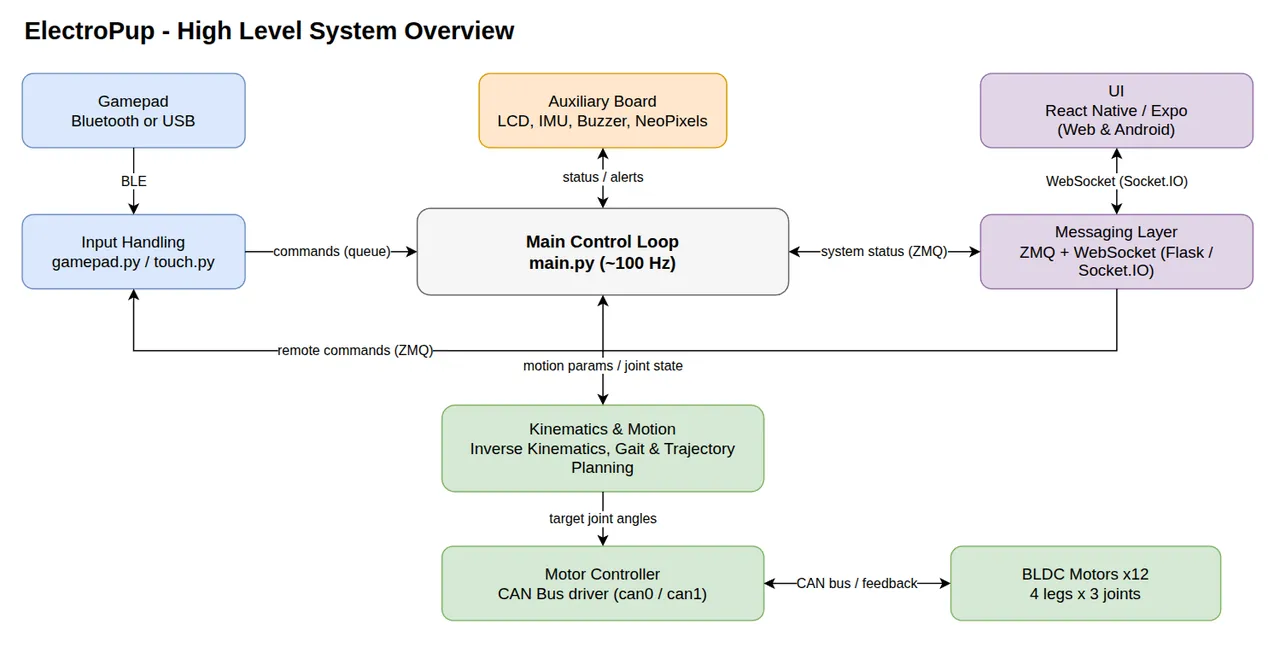
main.py runs a fixed 10 ms loop (0.010 s) that reads inputs, advances motion state, computes foot targets, solves inverse kinematics, and writes motor commands, then sleeps the delta to hold the rate constant. Status is pushed out over ZeroMQ PUSH/PULL sockets into a Flask server that re-emits it to browsers over Flask-SocketIO in threading mode. The UI itself is React Native with Expo, run as a web app; the Android build works but without the plots. Because the simulation and UI both run in dev mode, you can develop the whole stack on a laptop with no robot attached.
Inverse kinematics comes from mike4192's spot_micro_kinematics work. The chain is built from homogeneous transforms t_0_to_1 through t_0_to_4, and ikine(x4, y4, z4, l1, l2, l3) solves the three joint angles for a foot target, choosing the elbow branch with the sign of atan2(±sqrt(1 - D²), D). Body pose limits live in ik_parameters.py: roll ±30°, pitch ±25°, yaw ±30°, forward translation ±0.050 m with a permanent 0.025 m forward compensation to move the center of mass somewhere more stable, lateral ±0.075 m, height between 0.04 m and 0.275 m with a 0.2 m neutral, and a 0.040 deadzone on every axis.
Four gaits and Bezier feet
Gaits are constructed by a factory in trajectory_planner.py. All four use the BEZIER_ARC swing pattern and a 1.0 s period, and they differ in duty factor, step height, and phase offsets.
| Gait | Duty factor | Stride length | Step height | Phase offsets (FR, BL, FL, BR) |
|---|---|---|---|---|
| CRAWL | 0.75 | 0.10 m | 0.02 m | 0.0, 0.25, 0.5, 0.75 |
| TROT | 0.50 | 0.10 m | 0.02 m | 0.0, 0.0, 0.5, 0.5 |
| RUN | 0.50 | 0.10 m scaled | 0.06 m | 0.0, 0.0, 0.5, 0.5 |
| CLIMB | 0.50 | 0.10 m | 0.03 m | 0.0, 0.0, 0.5, 0.5 |
CRAWL is the only four-beat gait, stepping one leg at a time at 75 percent duty so three feet are always down. TROT, RUN and CLIMB are diagonal pairs. RUN is the interesting one: its stride length is scaled by command magnitude, abs(max(forward, lateral, angular)), so the same gait gives small quick steps at low command and full stride at full command, and the phase clock advances faster with a scaled rate. Step height triples from TROT's 0.02 m to 0.06 m to clear ground at speed.
Swing trajectories are cubic Bezier arcs; the alternative implementations (plain Bezier and a sine arc, h = step_height · sin(π · phase_time)) are kept in the same file so they can be compared. Turning is not a separate gait but a projection: a linear foot trajectory is projected onto a curved path, with 40 points around the ring. Two plotting scripts, bezier_curve_plot.py and projection_plot.py, render control points and projections so the geometry can be checked in a browser before it ever reaches a motor. Stand-to-walk handoffs go through TransitionPlanner, which sequences each leg through DOWN, ARC, HOLD and COMPLETE phases over 50-point trajectories.
Simulation, UI, and the auxiliary board
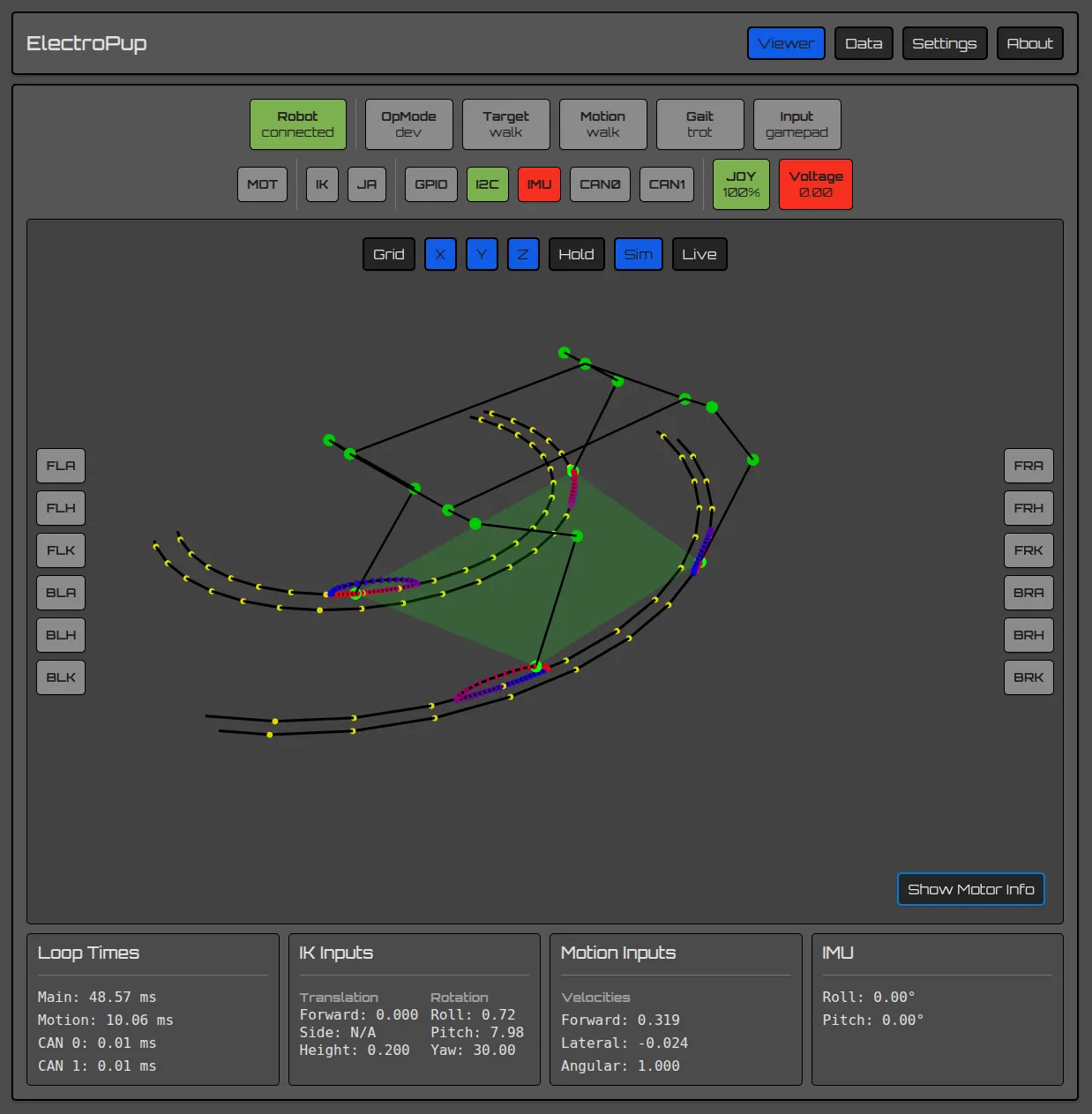
Simulation runs in MuJoCo via ./src/sim.sh against src/model/ElectroPup.xml, and input currently comes only from the gamepad. The author is upfront that the model lacks approximate masses and inertias, so the simulated robot is "rather bouncy." That is a real limitation for anyone hoping to tune controllers in sim first: the kinematics and gait logic transfer, the dynamics do not.
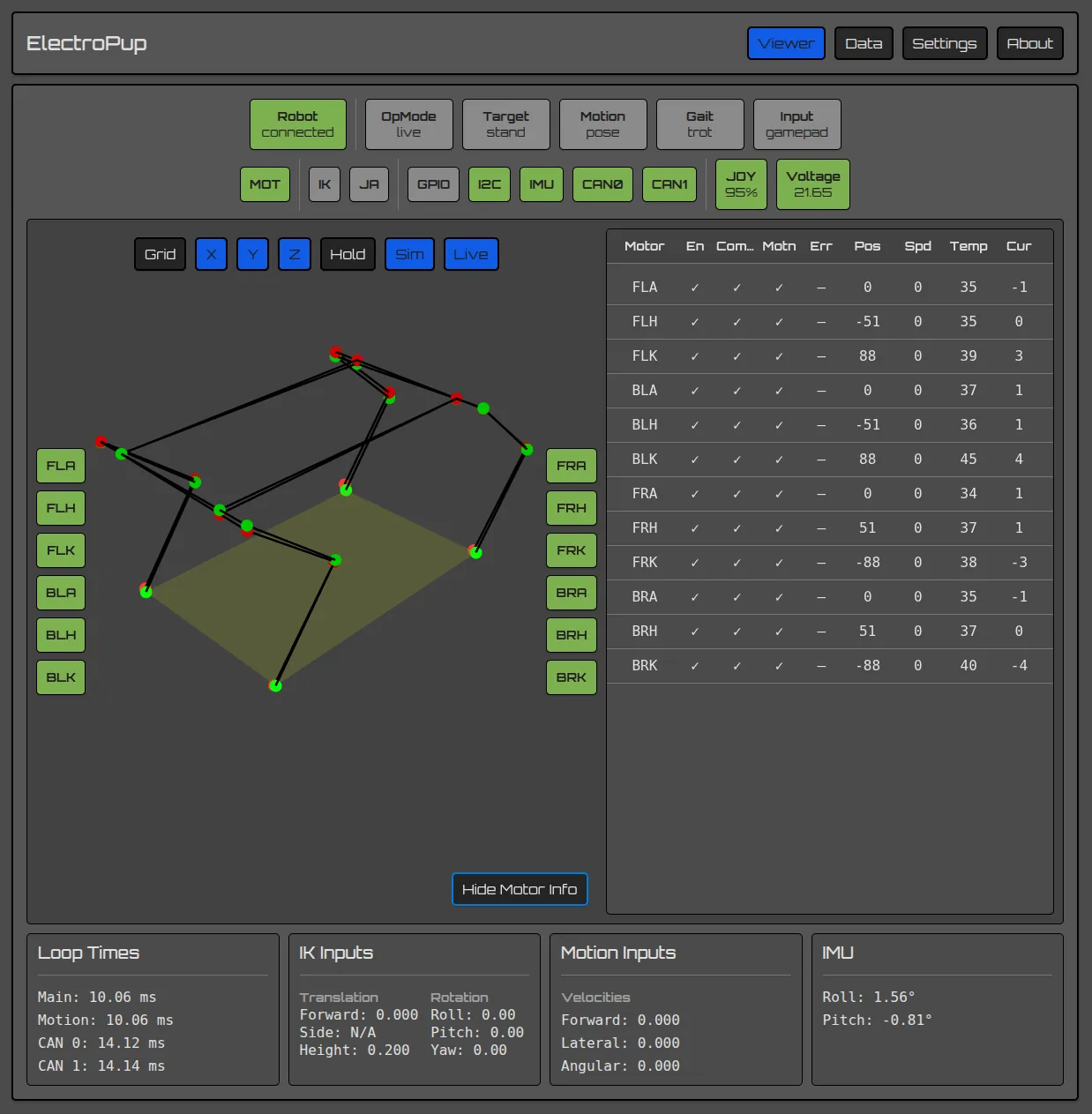
The UI is the project's most underrated piece. It shows joint positions, subsystem status, per-motor telemetry, inputs, sensor readings and loop times, and it overlays the simulated robot with the real pose reconstructed from motor feedback, which makes a kinematics bug visible in seconds instead of through a crash. It also visualizes the Bezier swing curves and the circular foot path used for turning.
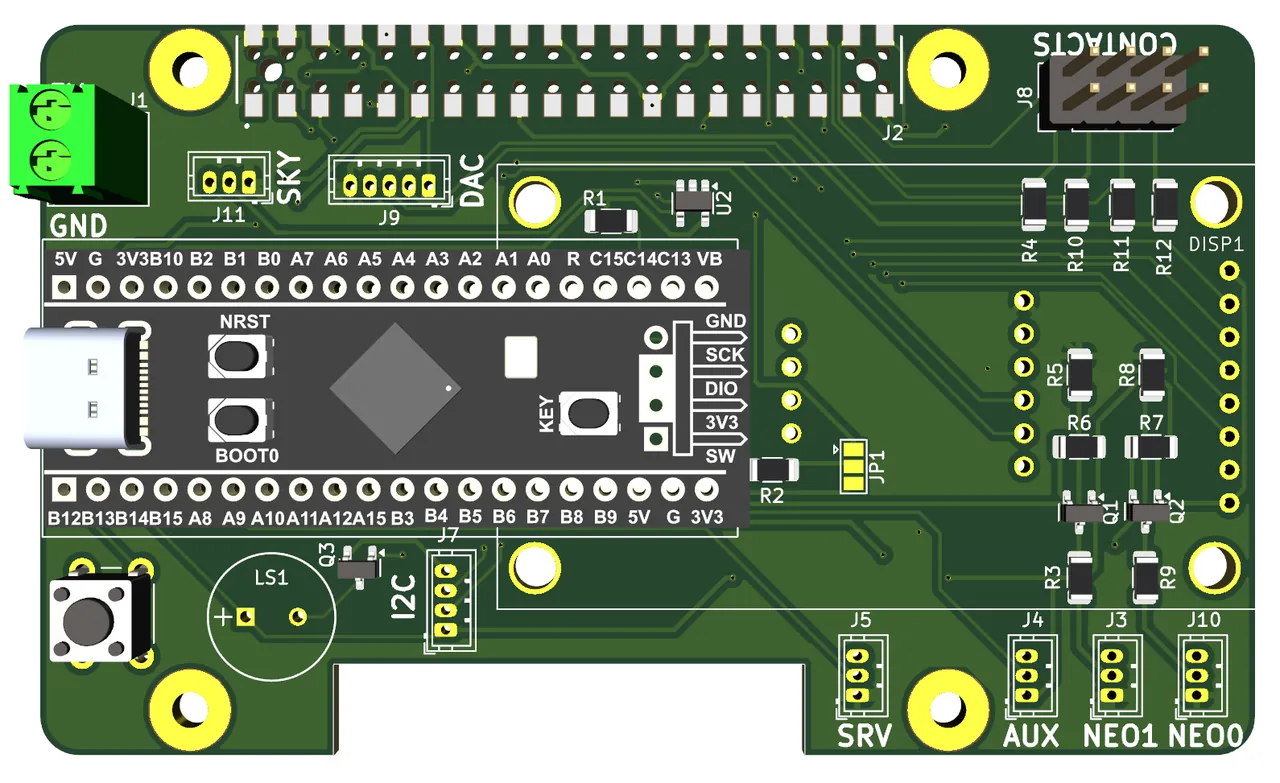
The optional auxiliary board runs on an STM32F401 Black Pill and adds an LCD, a variable-pitch buzzer, NeoPixel strips, an RC servo channel, I2C expansion, a button that controls the display and shuts the Pi down cleanly before power-off, and direct breakouts for the BNO055 IMU over I2C, four contact inputs, I2S for a future sound driver, and SBUS so an RC transmitter can take over if a Bluetooth gamepad misbehaves in a congested RF environment. The repository already carries drivers for the BNO055 and an INA228 power monitor, plus an I2C scanner. The author's own verdict on the board is that its complexity outweighs the LCD's usefulness given how much more data the web UI shows, and future revisions will either drive the LCD from the Pi or drop it.
Prints, CAD, and what is still missing
Parts are printed in Polymaker PolyMax Tough PLA, chosen for strength and ease of printing, with the main red set estimated at 25.23 hours and 742 g and the black accent set at 3.58 hours and 92 g. CAD lives in OnShape, which gives free full-access web CAD for non-commercial use, and the linked documents carry export permissions so a workspace can be copied. Three development environments are documented: an Ubuntu PC for plotting, simulation, KiCad and OrcaSlicer; the headless Raspberry Pi 5 on Raspberry Pi OS Lite Bookworm 64-bit with Python 3.13.5 under pyenv; and the STM32 toolchain through VSCode with PlatformIO.
The honest limitations list is long and specific. There is no contact sensing, so terrain handling is blind and future reinforcement learning has no foot-state signal; the IMU is fitted and driven but not yet used to smooth gaits; there is no center-of-mass calculation; the carbon rods twist during the RUN gait and need to be extended through the hip plates with face or butt plates; the battery and Pi positions should swap for better mass distribution; there is no voltage or current sensing on board yet, which is why an INA228 plus a fuse is on the Power Carrier roadmap; and there is no MPC controller. An upside-down recovery mode is listed as achievable because the frame already supports walking after a flip. The author also plans a full architecture refactor into separate services, which would restore per-component restart and unit testing.
There is an AI disclosure at the end of the README that is worth quoting because it is precise about scope: concept, aesthetic, engineering design and the original code base are the author's; portions of the codebase were reviewed, revised and written with the assistance of Claude Code. It is a clean example of how to state tool involvement without inflating or hiding it.
For someone deciding whether to build one, the practical read is this: ElectroPup is a complete, reproducible mid-size quadruped whose cost and mass are dominated by twelve CAN BLDC actuators, whose software is small enough to read end to end in an afternoon, and whose weaknesses are documented by the person who hit them. The two things to check before committing are the closed-source motor firmware and Windows-only configuration tool, and the absence of a license on the repository.
SOURCE LINKS